> ## Documentation Index
> Fetch the complete documentation index at: https://docs.xpertai.cn/llms.txt
> Use this file to discover all available pages before exploring further.
# Client Tools
Learn how to define tools that let the agent operate client-side capabilities.
Client tools route **model-initiated tool calls to the frontend UI for execution** and return results back to the model to continue reasoning. Use them for reading frontend state, handling user interaction, or leveraging browser capabilities.
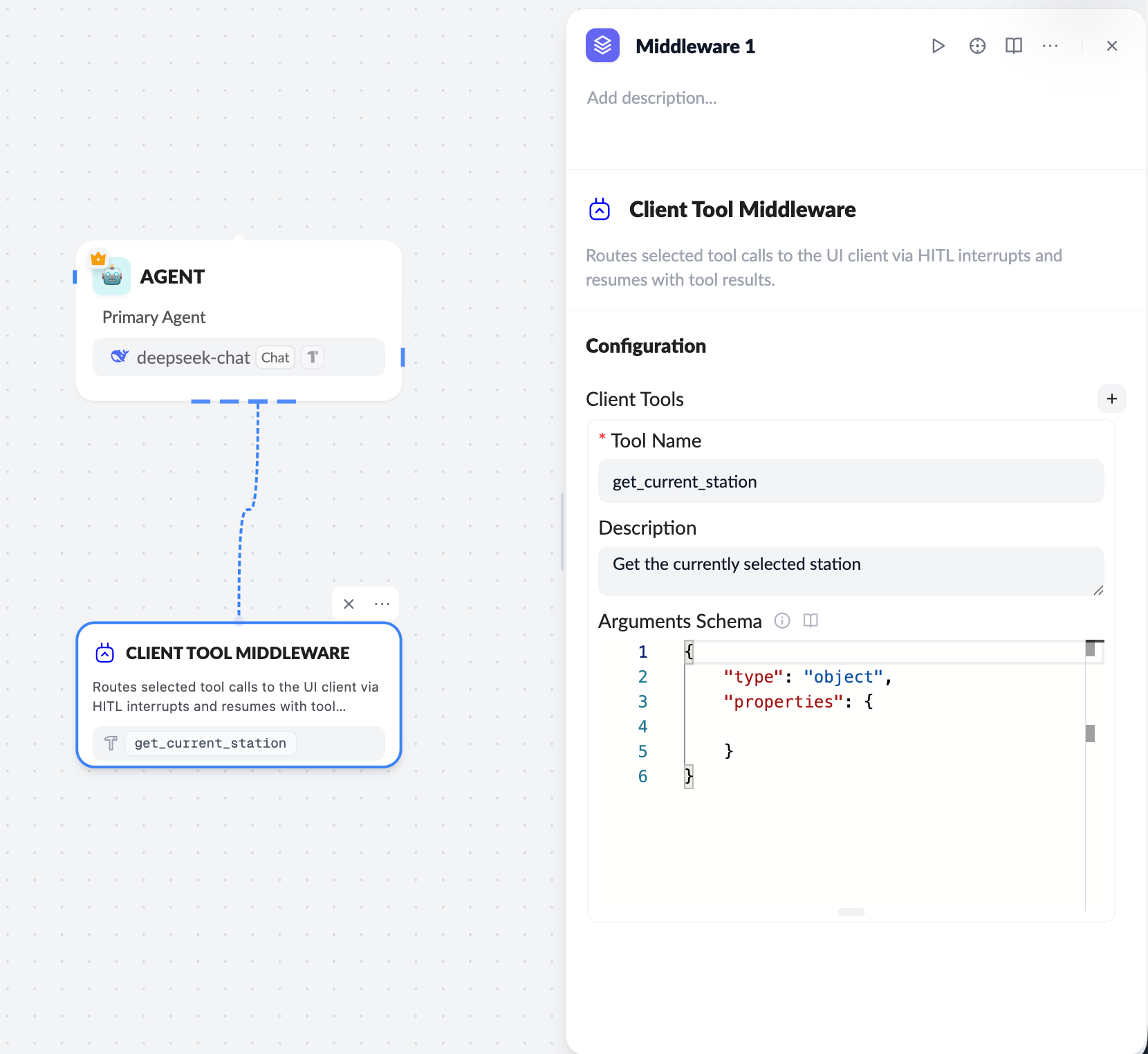 ## Workflow
1. **Configure the Client Tool on the server**
* Use the **Client Tool middleware** in the workflow
* Define `Tool Name / Description / Arguments Schema`
2. **Model triggers a tool call**
* The LLM calls the specified Client Tool based on context
3. **Frontend receives and executes**
* ChatKit sends the call to the frontend via `onClientTool`
* The frontend runs the real logic (UI or local state)
4. **Return the result**
* The frontend returns the tool result
* ChatKit passes the result back to the model to continue generation
***
## Server configuration essentials
**Tool Name**
* Unique identifier, for example `get_current_station`
* Must exactly match the `name` in frontend code
**Arguments Schema**
The schema must follow the [JSON Schema spec](https://json-schema.org/learn/getting-started-step-by-step):
```json theme={null}
{
"type": "object",
"properties": {}
}
```
***
## Frontend (React) integration
Register `onClientTool` in `useChatKit`:
```ts theme={null}
const handleClientTool = async ({ name, tool_call_id, id }) => {
if (name === 'get_current_station') {
return {
tool_call_id: tool_call_id || id,
name,
status: 'success',
content: JSON.stringify({ /* tool result */ }),
};
}
};
```
```ts theme={null}
useChatKit({
...
onClientTool: handleClientTool,
});
```
***
## Return payload format
* `tool_call_id`: required
* `status`: `success` or `error`
* `content`: string (JSON recommended)
```json theme={null}
{
"nodes": [...],
}
```
***
## Best practices
* Keep tool names identical between server and frontend
* Use `useRef` to read the latest UI state and avoid stale closures
* Keep `content` concise; avoid large payloads
* For failures, return `status: "error"`
***
Client tools let ChatKit safely and controllably integrate with frontend state and user interactions—a key capability for **HITL (Human-in-the-loop)** and **UI-aware agents**.
## Workflow
1. **Configure the Client Tool on the server**
* Use the **Client Tool middleware** in the workflow
* Define `Tool Name / Description / Arguments Schema`
2. **Model triggers a tool call**
* The LLM calls the specified Client Tool based on context
3. **Frontend receives and executes**
* ChatKit sends the call to the frontend via `onClientTool`
* The frontend runs the real logic (UI or local state)
4. **Return the result**
* The frontend returns the tool result
* ChatKit passes the result back to the model to continue generation
***
## Server configuration essentials
**Tool Name**
* Unique identifier, for example `get_current_station`
* Must exactly match the `name` in frontend code
**Arguments Schema**
The schema must follow the [JSON Schema spec](https://json-schema.org/learn/getting-started-step-by-step):
```json theme={null}
{
"type": "object",
"properties": {}
}
```
***
## Frontend (React) integration
Register `onClientTool` in `useChatKit`:
```ts theme={null}
const handleClientTool = async ({ name, tool_call_id, id }) => {
if (name === 'get_current_station') {
return {
tool_call_id: tool_call_id || id,
name,
status: 'success',
content: JSON.stringify({ /* tool result */ }),
};
}
};
```
```ts theme={null}
useChatKit({
...
onClientTool: handleClientTool,
});
```
***
## Return payload format
* `tool_call_id`: required
* `status`: `success` or `error`
* `content`: string (JSON recommended)
```json theme={null}
{
"nodes": [...],
}
```
***
## Best practices
* Keep tool names identical between server and frontend
* Use `useRef` to read the latest UI state and avoid stale closures
* Keep `content` concise; avoid large payloads
* For failures, return `status: "error"`
***
Client tools let ChatKit safely and controllably integrate with frontend state and user interactions—a key capability for **HITL (Human-in-the-loop)** and **UI-aware agents**.