> ## Documentation Index
> Fetch the complete documentation index at: https://docs.xpertai.cn/llms.txt
> Use this file to discover all available pages before exploring further.
# Template Transformation
The template node is used to dynamically format and combine variables from preceding nodes to generate structured text output. It supports [Handlebars](https://handlebarsjs.com/) template syntax, making it ideal for integrating multiple data sources into a text structure suitable for subsequent node processing.
This approach is particularly useful for:
* Combining multiple fields into natural language, Markdown, HTML, or other formats
* Constructing dynamic tables or list content
* Generating intermediate prompt information before AI responses
***
## 🔧 Usage Example: Concatenating Article Content
```handlebars theme={null}
# {{ title }}
> Author: {{ author }}
> Date: {{ date }}
## Summary
{{ summary }}
## Body
{{#each sections}}
### {{ this.heading }}
{{ this.content }}
---
{{/each}}
```
This template takes data from upstream nodes, such as article title, author, date, and section content, and outputs a structured Markdown document.
📦 Input Example:
```json theme={null}
{
"title": "How to Build an AI Copilot",
"author": "XpertAI",
"date": "2025-05-29",
"summary": "This article introduces how to build AI assistants tailored for business scenarios in enterprise systems.",
"sections": [
{ "heading": "Background", "content": "The demand for intelligent analysis in enterprises is growing..." },
{ "heading": "Implementation", "content": "Combine LLMs, workflow orchestration, and data indexing..." }
]
}
```
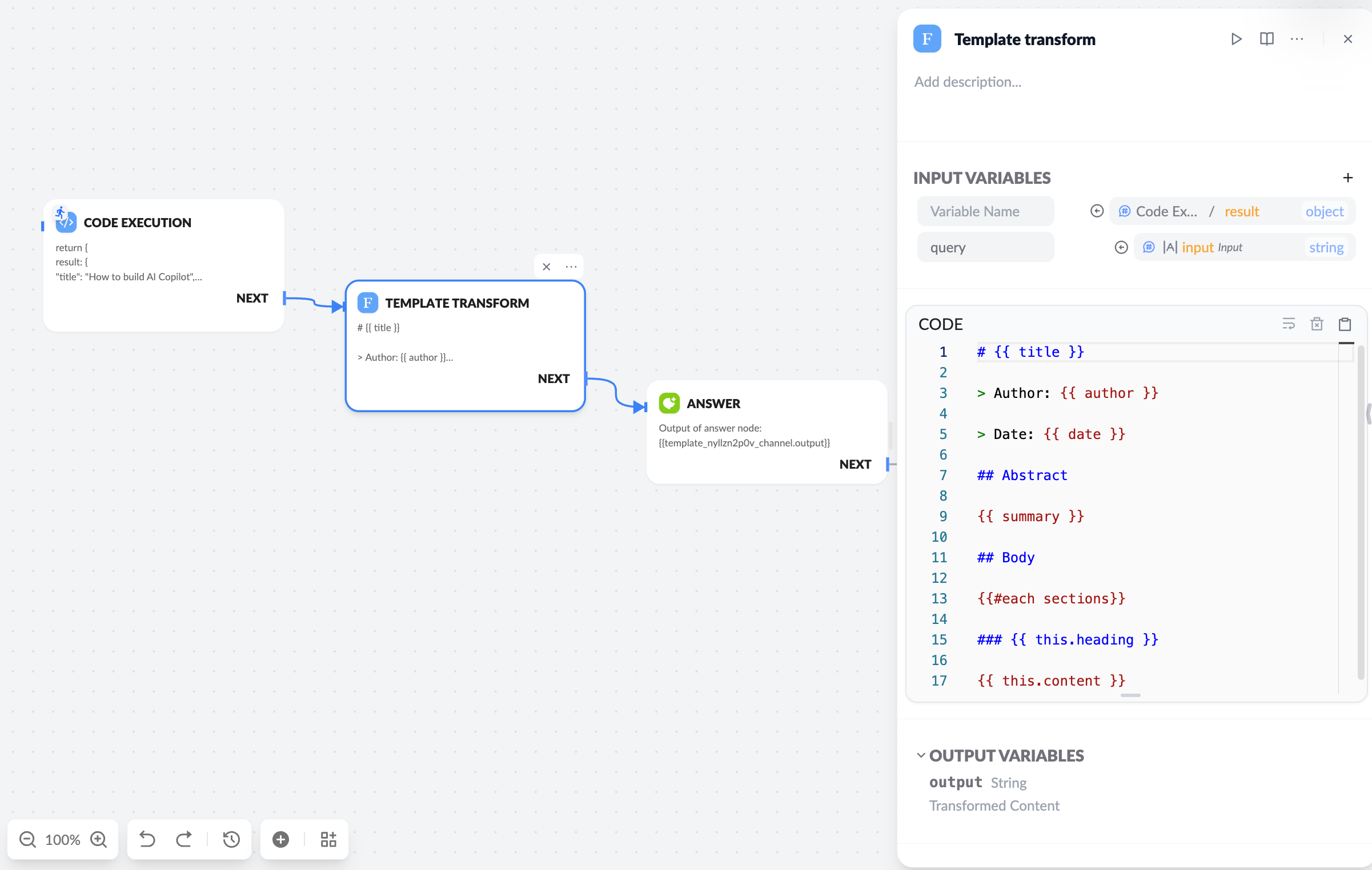 **Input Parameters**
* Variable Name: Uses the value of this state variable in the template context.
* Empty Variable Name: Uses this variable value as the global template context.
***
## 💡 Advanced Usage
### Conditional Logic:
```text theme={null}
{{#if user.vip}}
Welcome, esteemed VIP user {{ user.name }}!
{{else}}
Welcome, {{ user.name }}!
{{/if}}
```
### Looping Lists:
```text theme={null}
{{#each items}}
- {{ this }}
{{/each}}
```
### Table Construction:
```text theme={null}
| Metric | Value |
|--------|-------|
{{#each metrics}}
| {{ name }} | {{ value }} |
{{/each}}
```
***
## 🧠 Application Scenarios
* **Knowledge Retrieval Formatting**: Unify content blocks from document retrieval
* **Markdown Message Output**: Prepare structured responses for platforms like Feishu or Slack
* **Form Construction**: Output interactive HTML form content
* **Pre-AI Response Guidance**: Generate intermediate prompts to guide further user interaction
***
## 🧪 Example: Output HTML Form
```html theme={null}
```
This HTML can be dynamically generated by the template node and displayed on downstream platforms, supporting custom fields and prompt information.
***
## 📌 Tips
* Variables in the template come from the JSON output of upstream nodes.
* Supports nested access, e.g., `user.name`, `item.metadata.score`.
***
> The template node is typically used in the middle of a workflow to format output results for display or to pass to the next tool node or model call.
For detailed Handlebars syntax, refer to the [Handlebars Official Documentation](https://handlebarsjs.com/guide/).
**Input Parameters**
* Variable Name: Uses the value of this state variable in the template context.
* Empty Variable Name: Uses this variable value as the global template context.
***
## 💡 Advanced Usage
### Conditional Logic:
```text theme={null}
{{#if user.vip}}
Welcome, esteemed VIP user {{ user.name }}!
{{else}}
Welcome, {{ user.name }}!
{{/if}}
```
### Looping Lists:
```text theme={null}
{{#each items}}
- {{ this }}
{{/each}}
```
### Table Construction:
```text theme={null}
| Metric | Value |
|--------|-------|
{{#each metrics}}
| {{ name }} | {{ value }} |
{{/each}}
```
***
## 🧠 Application Scenarios
* **Knowledge Retrieval Formatting**: Unify content blocks from document retrieval
* **Markdown Message Output**: Prepare structured responses for platforms like Feishu or Slack
* **Form Construction**: Output interactive HTML form content
* **Pre-AI Response Guidance**: Generate intermediate prompts to guide further user interaction
***
## 🧪 Example: Output HTML Form
```html theme={null}
```
This HTML can be dynamically generated by the template node and displayed on downstream platforms, supporting custom fields and prompt information.
***
## 📌 Tips
* Variables in the template come from the JSON output of upstream nodes.
* Supports nested access, e.g., `user.name`, `item.metadata.score`.
***
> The template node is typically used in the middle of a workflow to format output results for display or to pass to the next tool node or model call.
For detailed Handlebars syntax, refer to the [Handlebars Official Documentation](https://handlebarsjs.com/guide/).