> ## Documentation Index
> Fetch the complete documentation index at: https://docs.xpertai.cn/llms.txt
> Use this file to discover all available pages before exploring further.
# 🤖 AI Copilot
The AI Copilot in the Story Dashboard toolbar provides natural language control for dashboard settings, including global styling, properties of graphical components, and widget styles. By interacting with the AI Copilot, you can use natural language commands and instructions to customize and adjust the appearance of the dashboard, chart attributes, and component styles, making the design and configuration of the Story Dashboard more efficient.
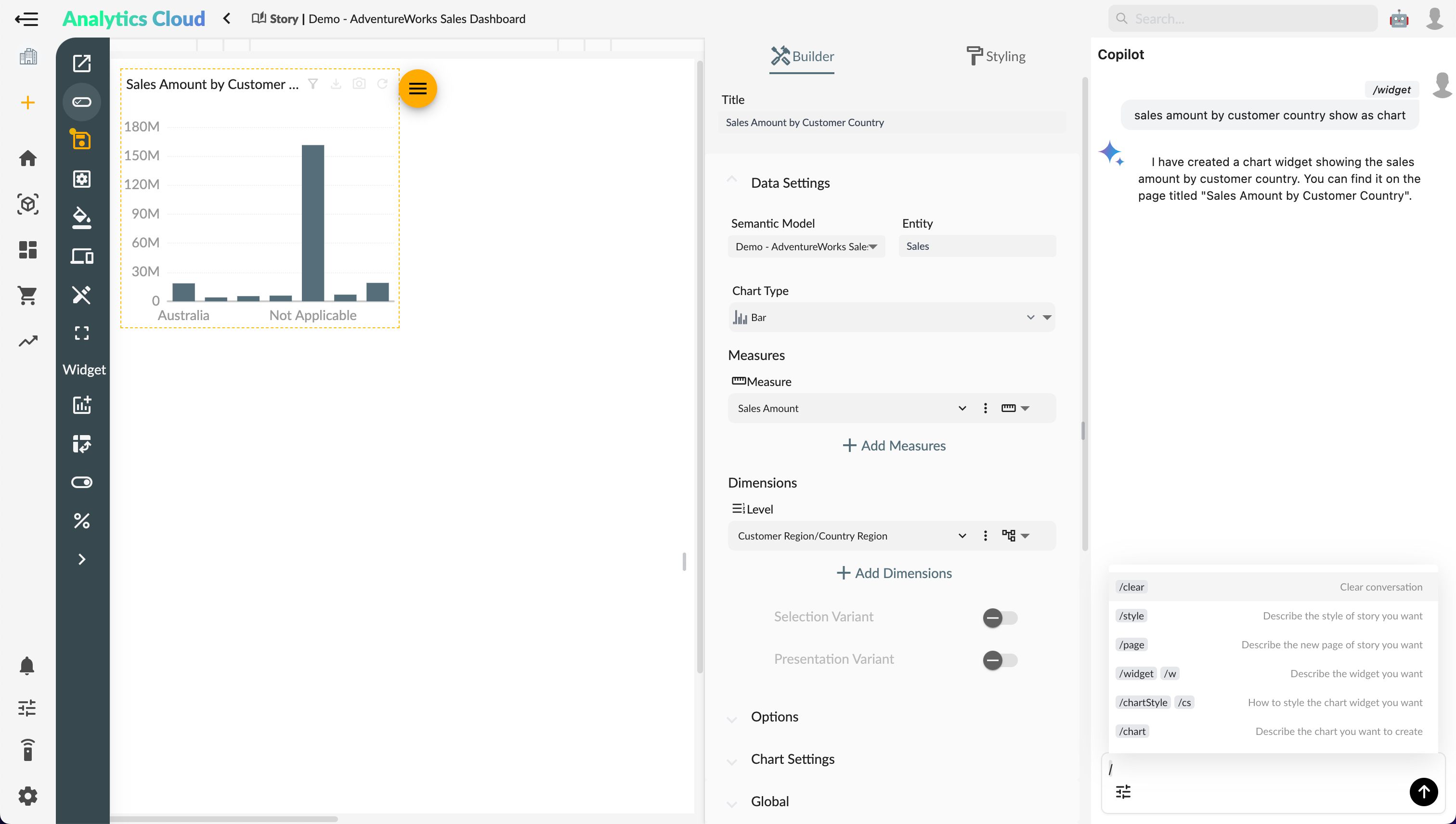 **List of Story Copilot Commands:**
| Command | Description |
| ------------------------------ | ------------------------------- |
| [`/calculation`](#calculation) | Create new calculation measures |
| [`/style`](#style) | Global styling |
| [`/page`](#page) | Create a new story page |
| [`/widget`](#widget) | Create or modify a widget |
| [`/story`](#story) | Create a Story Dashboard |
## /calculation
The `/calculation` or `/cc` [🦜️🔗](../../ai/copilot/#🦜️🔗) command can be used to create and modify calculation measures.
**List of Story Copilot Commands:**
| Command | Description |
| ------------------------------ | ------------------------------- |
| [`/calculation`](#calculation) | Create new calculation measures |
| [`/style`](#style) | Global styling |
| [`/page`](#page) | Create a new story page |
| [`/widget`](#widget) | Create or modify a widget |
| [`/story`](#story) | Create a Story Dashboard |
## /calculation
The `/calculation` or `/cc` [🦜️🔗](../../ai/copilot/#🦜️🔗) command can be used to create and modify calculation measures.
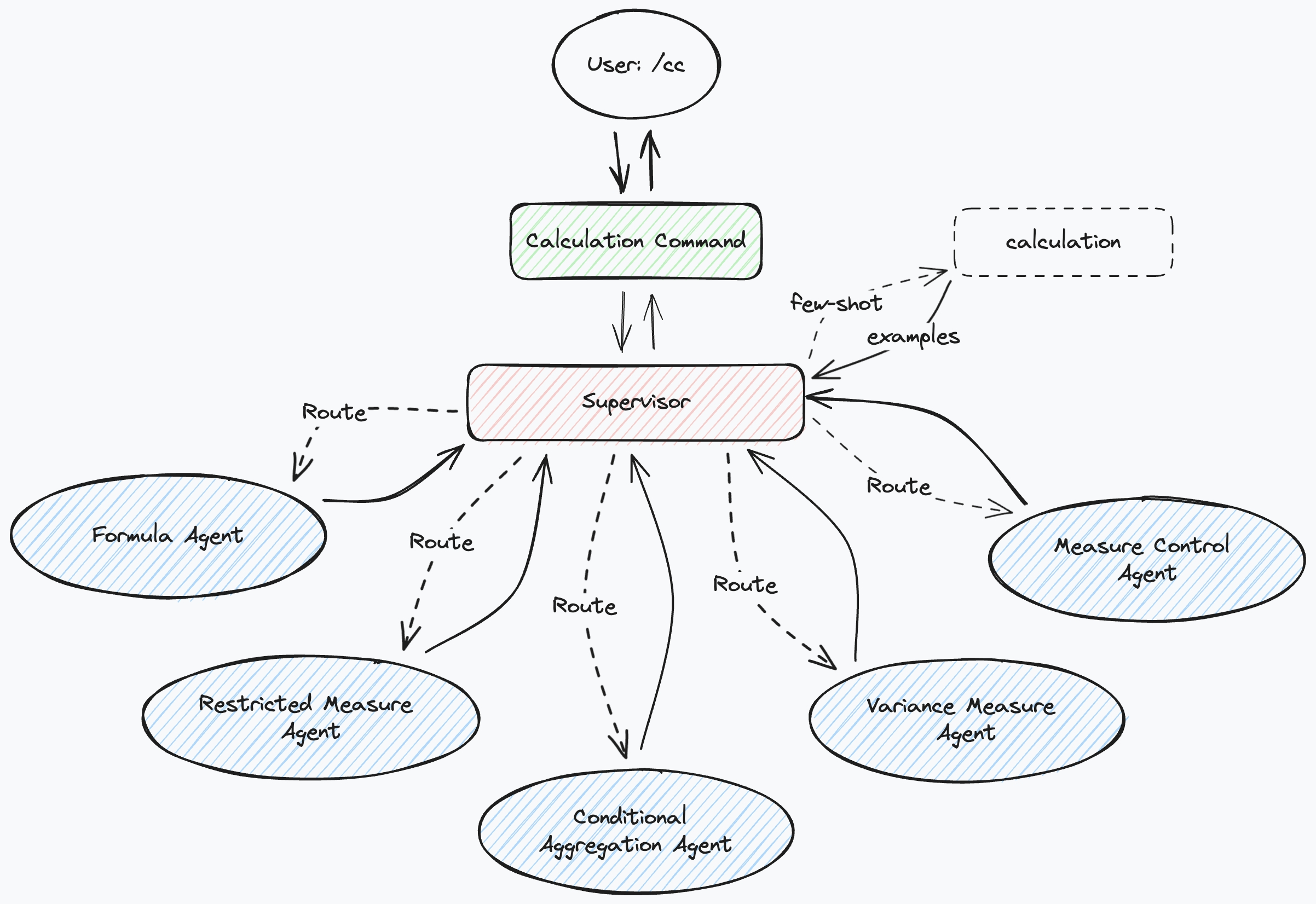 For operations related to calculation measures, refer to [🧮 Calculation Measures](../calculations/).
### Use Cases for Calculation Measures
* **Conditional Aggregation**
`/calculation @Sales Top Count 5 product category sales amount`
`/calculation @Sales Top percent 20% products total sales amount`
* **Restricted Measures**
`/calculation @Sales sales amount of product category 'Clothing'`
* **Difference Measures**
`/calculation @Sales Sales amount YoY growth`
* **Calculation Formulas**
`/calculation @Sales calculate the year-to-date sales by order date`
* **Metric Selection**
`/calculation @Sales measure selector includes: sales amount, profit, profit growth, sales quantity`
## /style
You can use natural language commands and instructions to customize and adjust the global styling settings of the Story Dashboard, including themes, backgrounds, fonts, and colors.
The `/style` command can be used to set the global style of the Story Dashboard.
## /page
The `/page` or `/p` page command agent can assist users in creating new story pages.
For operations related to calculation measures, refer to [🧮 Calculation Measures](../calculations/).
### Use Cases for Calculation Measures
* **Conditional Aggregation**
`/calculation @Sales Top Count 5 product category sales amount`
`/calculation @Sales Top percent 20% products total sales amount`
* **Restricted Measures**
`/calculation @Sales sales amount of product category 'Clothing'`
* **Difference Measures**
`/calculation @Sales Sales amount YoY growth`
* **Calculation Formulas**
`/calculation @Sales calculate the year-to-date sales by order date`
* **Metric Selection**
`/calculation @Sales measure selector includes: sales amount, profit, profit growth, sales quantity`
## /style
You can use natural language commands and instructions to customize and adjust the global styling settings of the Story Dashboard, including themes, backgrounds, fonts, and colors.
The `/style` command can be used to set the global style of the Story Dashboard.
## /page
The `/page` or `/p` page command agent can assist users in creating new story pages.
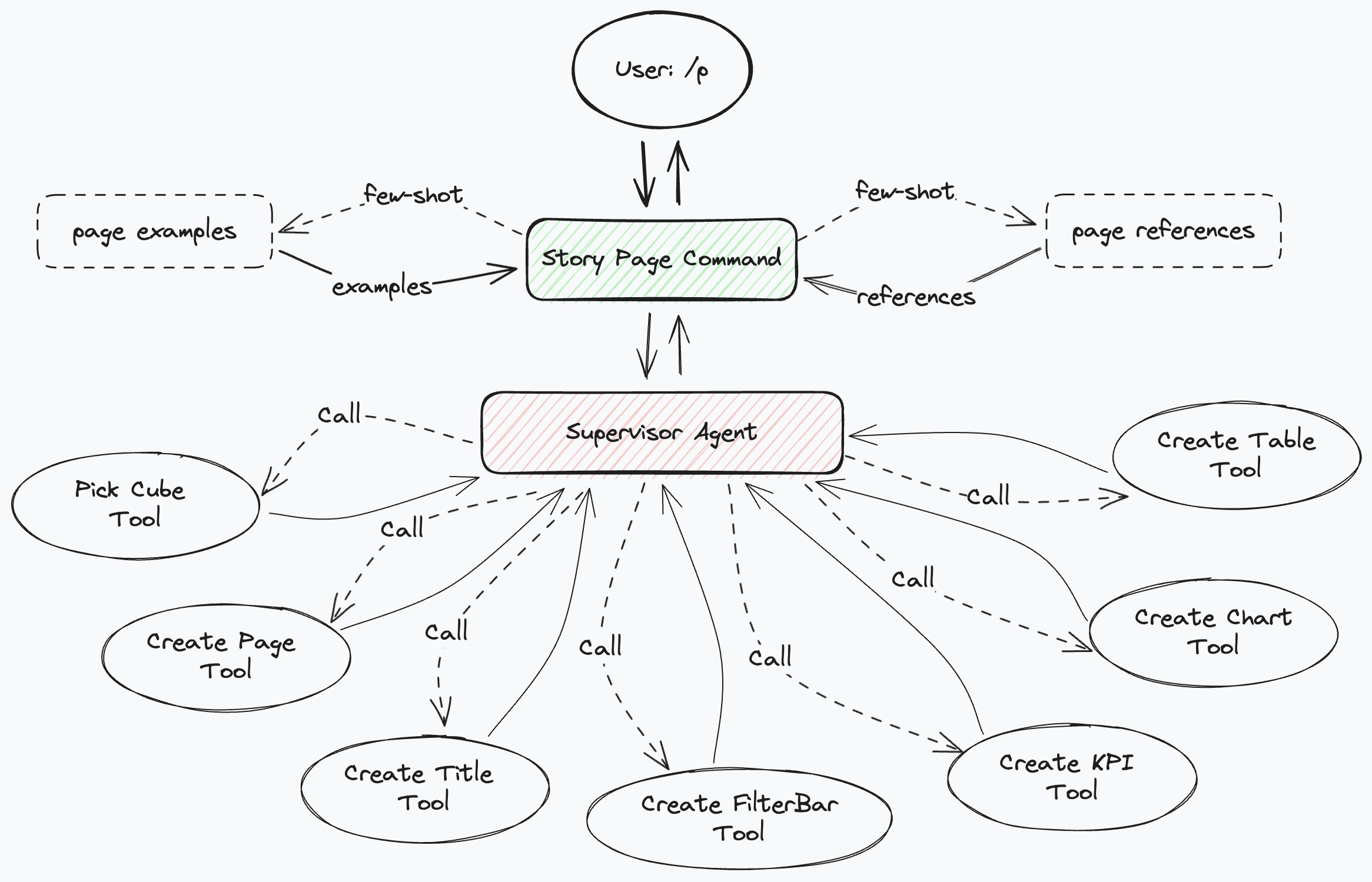 **Example:**
* `/page analyze the latest sales performance by dealer, with at least 8 charts, 1 KPI, and 1 table`
## /widget
The `/widget` or `/w` widget command agent can assist users in creating or modifying story widgets.
**Example:**
* `/page analyze the latest sales performance by dealer, with at least 8 charts, 1 KPI, and 1 table`
## /widget
The `/widget` or `/w` widget command agent can assist users in creating or modifying story widgets.
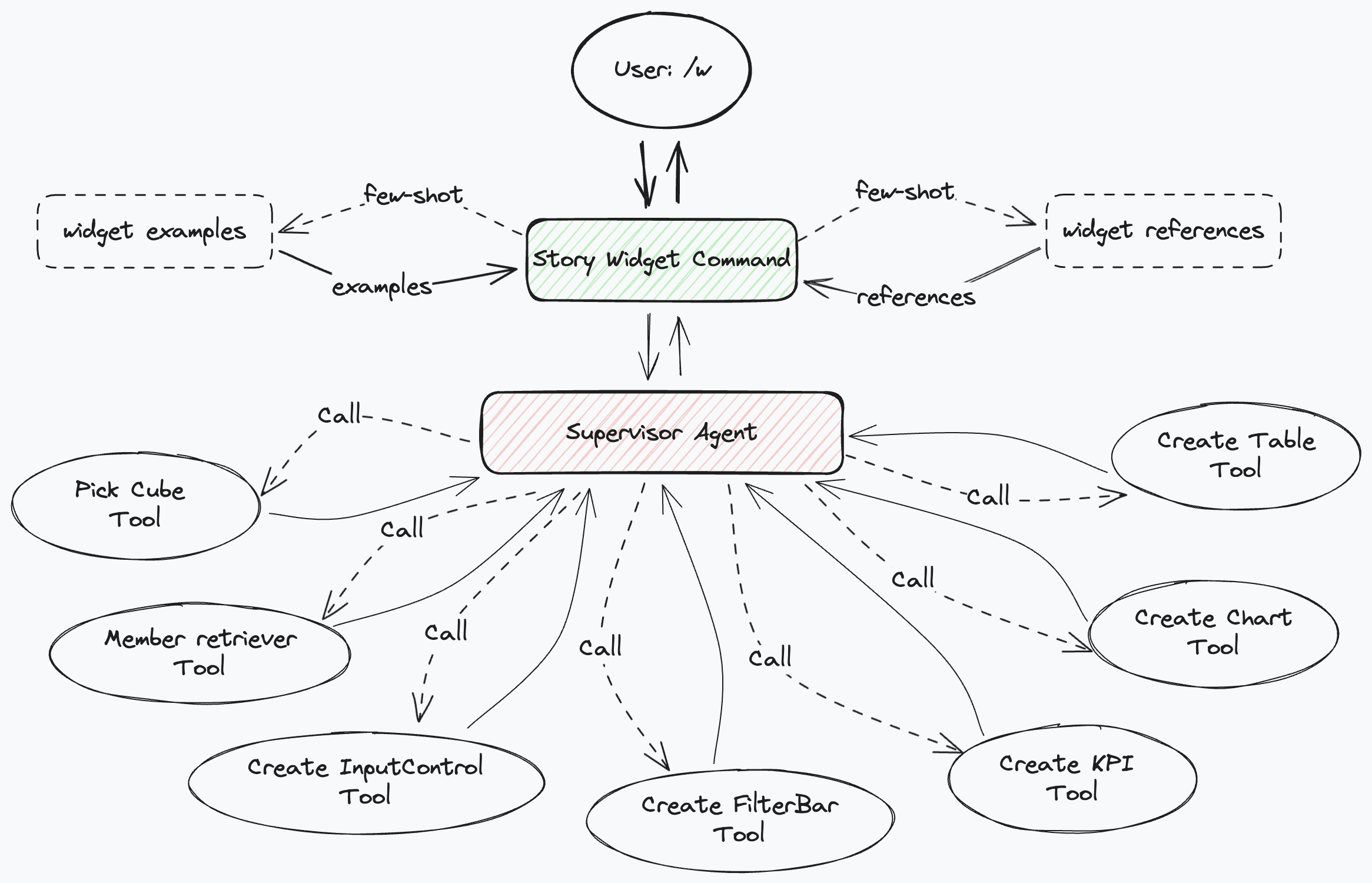 **Example:**
* `/w sales by customer country`
## /story
The story command acts as a super-agent, coordinating the invocation of various sub-command agents to complete more complex tasks.
**Example:**
* `/w sales by customer country`
## /story
The story command acts as a super-agent, coordinating the invocation of various sub-command agents to complete more complex tasks.
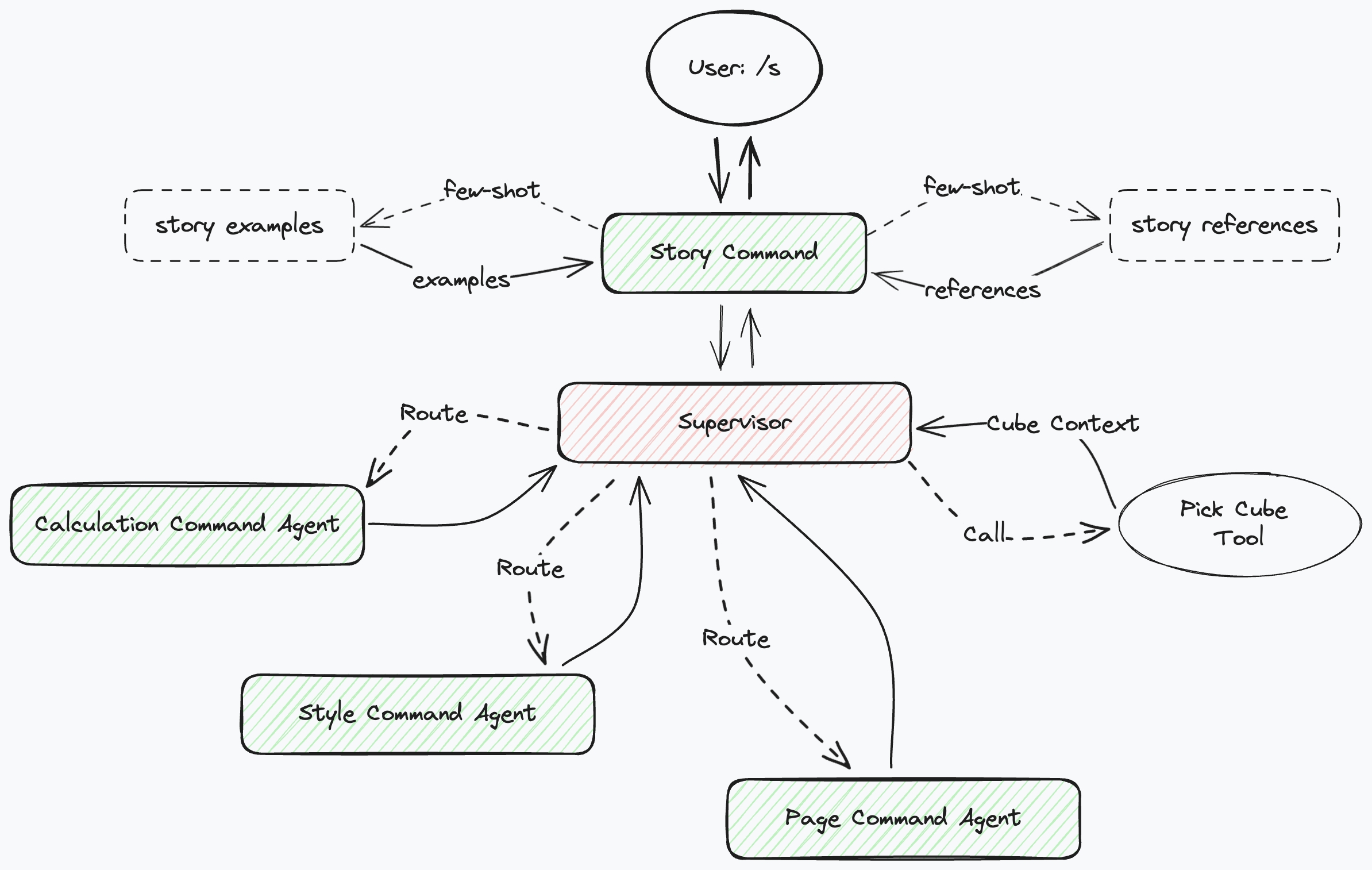 The Story Intelligent Assistant is a multi-agent system architecture where multiple agents collaborate to complete different tasks:
1. **User /s**: The user inputs the story command `/s` and prompt, interacting with the system through commands.
2. **Story Command**: Executes the story command and retrieves examples and reference information from the knowledge base (such as "story examples" and "story references").
3. **Supervisor**: A central agent that manages and coordinates sub-agents. It receives commands from the user and assigns tasks to different sub-agents or tools as needed, such as the dataset selection tool.
4. [**Calculation Command Agent**](#calculation): A specialized agent for creating calculation measures. When a user command involves calculation measures, the Supervisor routes the task to this agent.
5. [**Style Command Agent**](#style): Handles tasks related to global styling or configuration, such as text formatting or color style modification. The Supervisor assigns relevant tasks to it.
6. [**Page Command Agent**](#page): Responsible for handling tasks related to creating new story dashboard pages, such as layout and page creation. The Supervisor routes these tasks to this agent.
7. **Pick Cube Tool**: A tool component for selecting datasets, invoked when the command context lacks dataset information.
8. **Story Examples** and **Story References**: Reference materials and examples in the system's knowledge base, used to provide context or inspiration when processing commands. The story command can access these resources and pass relevant information to the appropriate agent.
**Workflow Overview:**
* The user inputs a command (e.g., `/story`).
* The story command retrieves relevant examples and references from the system knowledge base.
* The Supervisor receives the command, determines which agents and tools are needed to complete the task, and routes the tasks to the appropriate agents, such as the Calculation Command Agent, Style Command Agent, Page Command Agent, etc.
* The Supervisor calls tools (such as the Pick Cube Tool for dataset selection) to perform specific operations if necessary.
* Agents complete their respective tasks and return results to the Supervisor.
* The final result is returned to the user through the Supervisor.
* This process can be iteratively executed through multiple dialogues.
The advantage of this architecture lies in its modular design, with each agent focusing on specific tasks, making the system easier to extend and maintain.
The Story Intelligent Assistant is a multi-agent system architecture where multiple agents collaborate to complete different tasks:
1. **User /s**: The user inputs the story command `/s` and prompt, interacting with the system through commands.
2. **Story Command**: Executes the story command and retrieves examples and reference information from the knowledge base (such as "story examples" and "story references").
3. **Supervisor**: A central agent that manages and coordinates sub-agents. It receives commands from the user and assigns tasks to different sub-agents or tools as needed, such as the dataset selection tool.
4. [**Calculation Command Agent**](#calculation): A specialized agent for creating calculation measures. When a user command involves calculation measures, the Supervisor routes the task to this agent.
5. [**Style Command Agent**](#style): Handles tasks related to global styling or configuration, such as text formatting or color style modification. The Supervisor assigns relevant tasks to it.
6. [**Page Command Agent**](#page): Responsible for handling tasks related to creating new story dashboard pages, such as layout and page creation. The Supervisor routes these tasks to this agent.
7. **Pick Cube Tool**: A tool component for selecting datasets, invoked when the command context lacks dataset information.
8. **Story Examples** and **Story References**: Reference materials and examples in the system's knowledge base, used to provide context or inspiration when processing commands. The story command can access these resources and pass relevant information to the appropriate agent.
**Workflow Overview:**
* The user inputs a command (e.g., `/story`).
* The story command retrieves relevant examples and references from the system knowledge base.
* The Supervisor receives the command, determines which agents and tools are needed to complete the task, and routes the tasks to the appropriate agents, such as the Calculation Command Agent, Style Command Agent, Page Command Agent, etc.
* The Supervisor calls tools (such as the Pick Cube Tool for dataset selection) to perform specific operations if necessary.
* Agents complete their respective tasks and return results to the Supervisor.
* The final result is returned to the user through the Supervisor.
* This process can be iteratively executed through multiple dialogues.
The advantage of this architecture lies in its modular design, with each agent focusing on specific tasks, making the system easier to extend and maintain.