> ## Documentation Index
> Fetch the complete documentation index at: https://docs.xpertai.cn/llms.txt
> Use this file to discover all available pages before exploring further.

# 🤖对话机器人

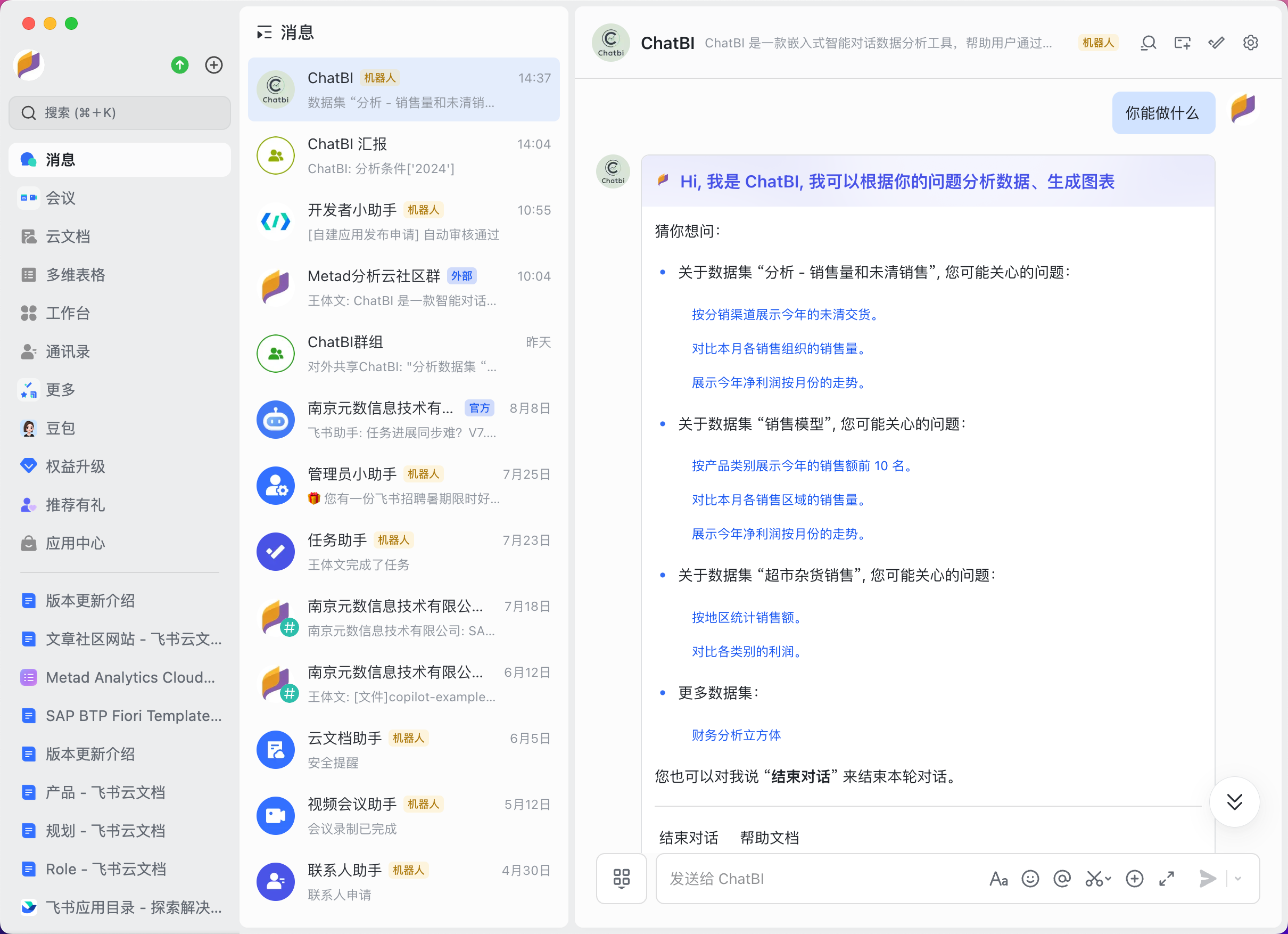
开始对话时，ChatBI 机器人会给出当前可用的数据模型的常见问题，帮助用户快速开始对话。用户可以直接点击关心的问题，或手动输入自定义问题进行对话。

<img src="https://mintcdn.com/xpertai/IL25qkwj-czMDTNd/public/img/chatbi/lark-chatbot-welcome.png?fit=max&auto=format&n=IL25qkwj-czMDTNd&q=85&s=0c90e3fd62b18e2f1d692ecdf2551879" alt="Lark chatbot welcome" width="2420" height="1754" data-path="public/img/chatbi/lark-chatbot-welcome.png" />

## 基础问题

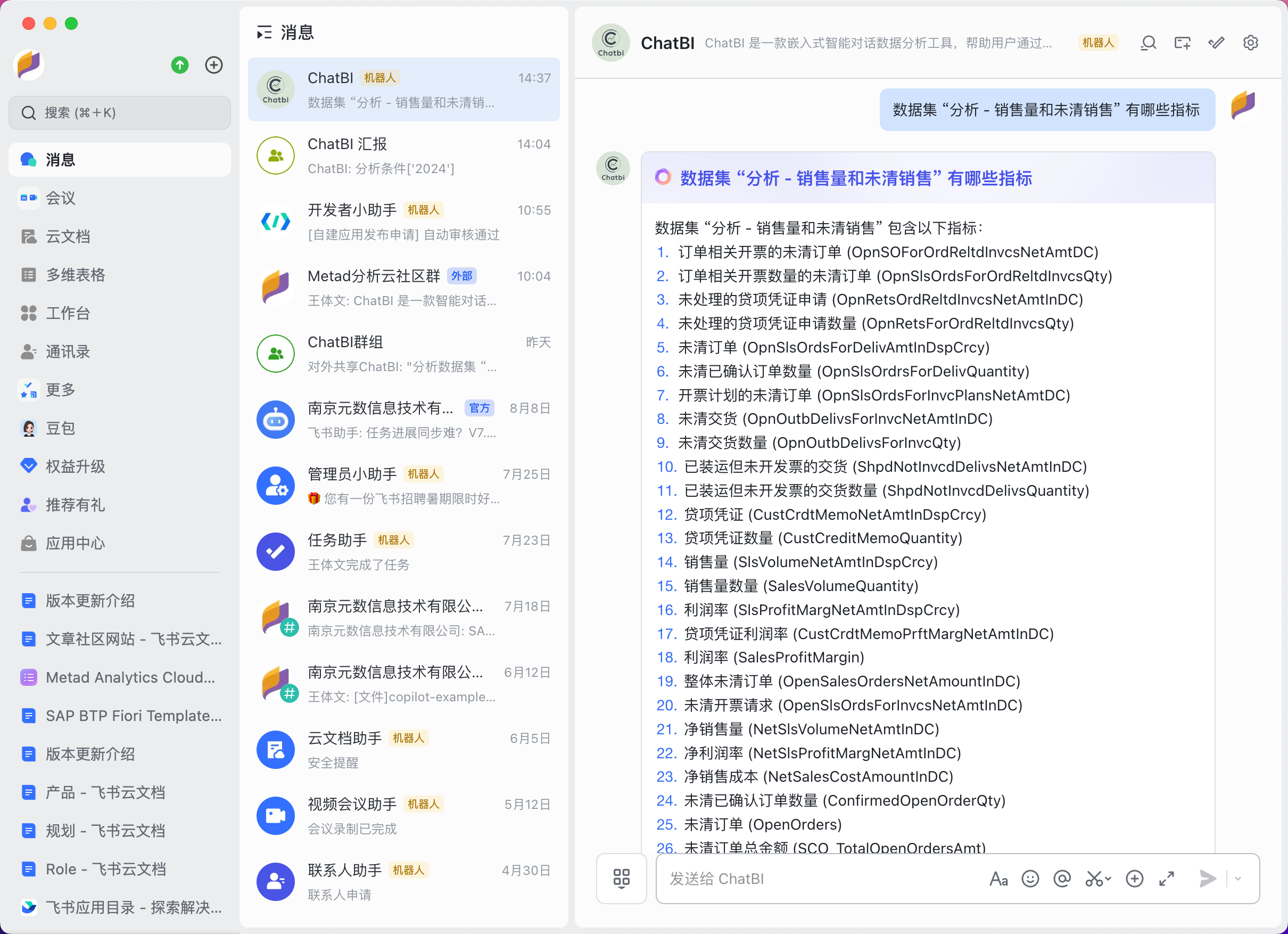
用户还可以自由询问数据模型相关问题，例如询问模型具体有哪些指标、维度等信息，还可以问 ChatBI 能帮你创建哪些图形之类的。

<img src="https://mintcdn.com/xpertai/IL25qkwj-czMDTNd/public/img/chatbi/lark-chatbot-measures.png?fit=max&auto=format&n=IL25qkwj-czMDTNd&q=85&s=0d3781adc7ce063835a628f5f670601a" alt="Lark chatbot measures" width="2420" height="1754" data-path="public/img/chatbi/lark-chatbot-measures.png" />

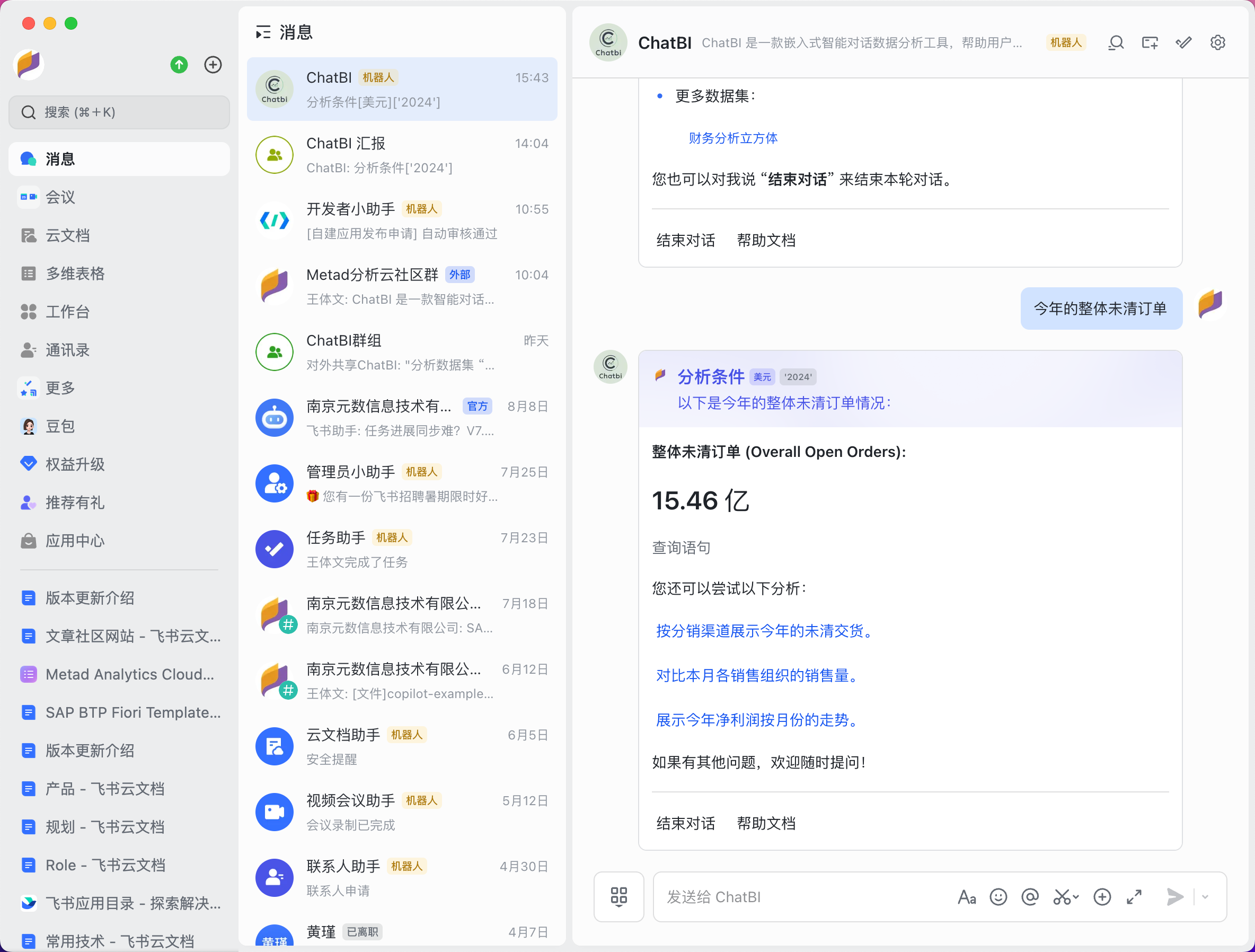
自由询问数据问题或点击示例快速对话，ChatBI 会根据你的问题结合系统中的数据模型信息，在知识库中查找相关问题知识作为参考，然后调用大模型给出答案。
ChatBI 再根据大模型给出的答案，去调用数据源拿到实际的数据结果，将以各种形式，如图形、指标或表格的形式返回给用户消息。

<img src="https://mintcdn.com/xpertai/IL25qkwj-czMDTNd/public/img/chatbi/lark-chatbot-kpi.png?fit=max&auto=format&n=IL25qkwj-czMDTNd&q=85&s=f3629f29bd5b7e6547d294a291b5057f" alt="Lark chatbot kpi" width="2368" height="1796" data-path="public/img/chatbi/lark-chatbot-kpi.png" />

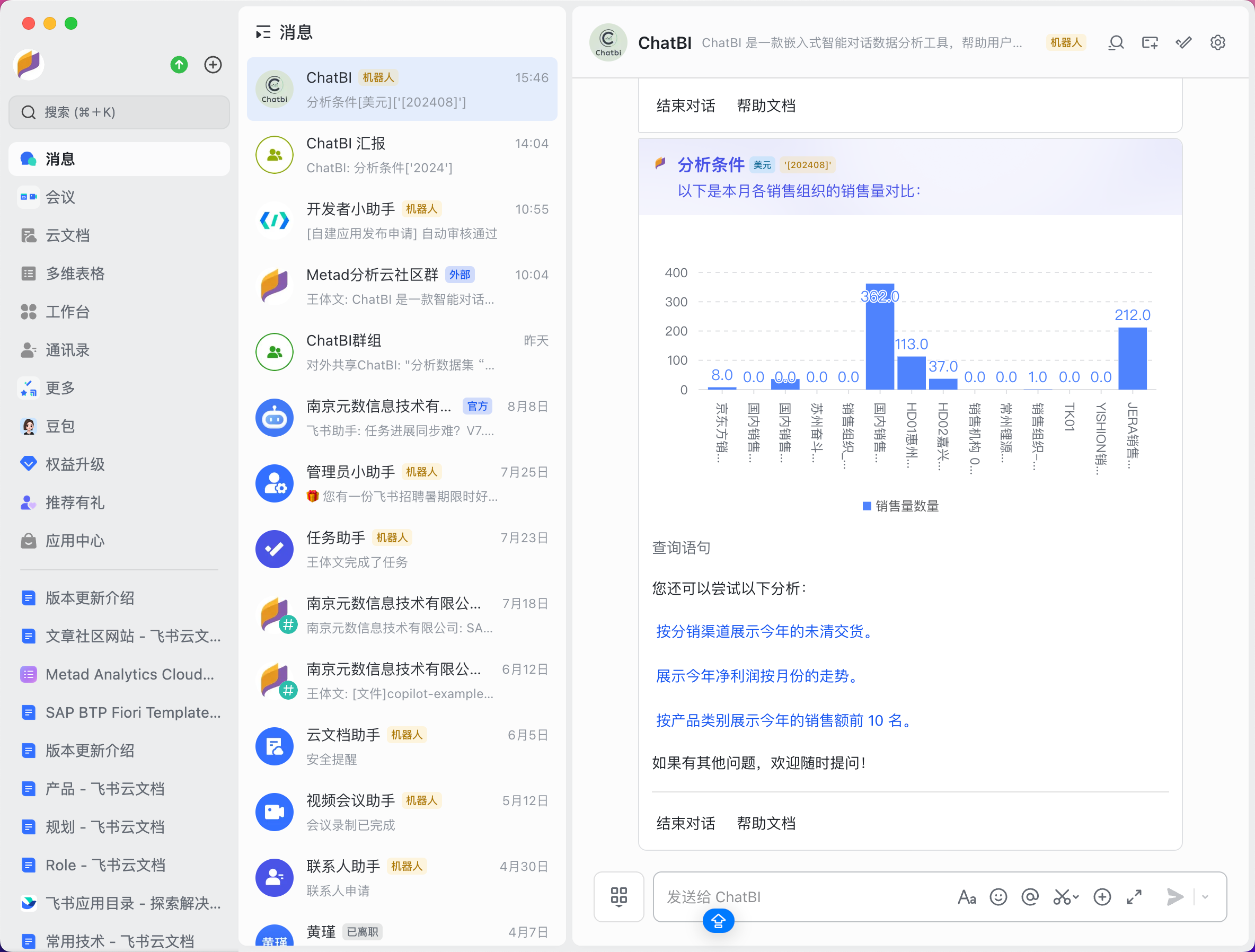
如果以图形形式返回数据结果，目前机器人消息中支持柱形图、线形图和饼图三种图形类型。

<img src="https://mintcdn.com/xpertai/IL25qkwj-czMDTNd/public/img/chatbi/lark-chatbot-chart.png?fit=max&auto=format&n=IL25qkwj-czMDTNd&q=85&s=a465adeaab6e4e17bdb159141dec95c8" alt="Lark chatbot chart" width="2368" height="1796" data-path="public/img/chatbi/lark-chatbot-chart.png" />

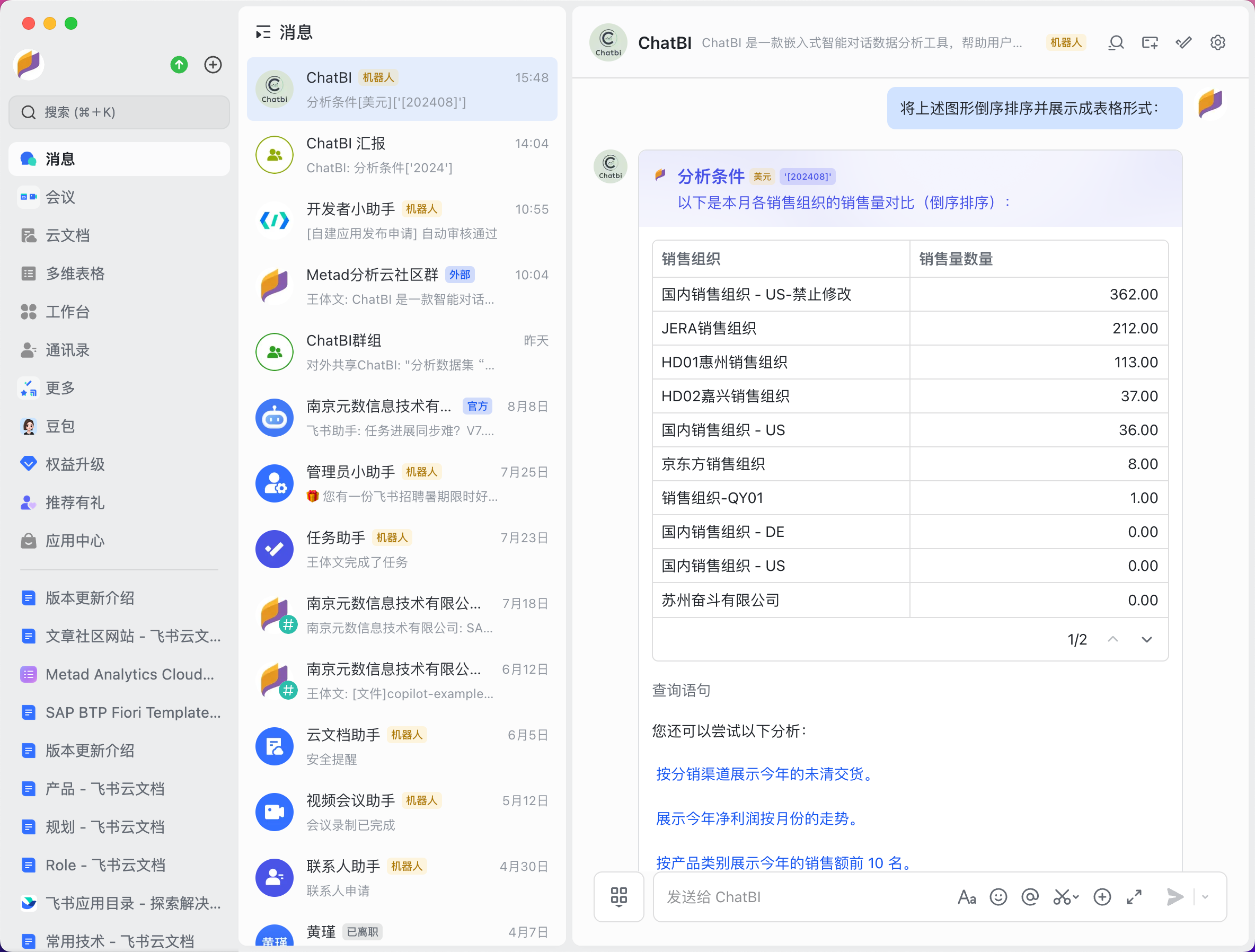
数据还可以以数据表格的形式返回在消息中。

<img src="https://mintcdn.com/xpertai/IL25qkwj-czMDTNd/public/img/chatbi/lark-chatbot-table.png?fit=max&auto=format&n=IL25qkwj-czMDTNd&q=85&s=dc147956bd5f884296393dbbd994e9ea" alt="Lark chatbot table" width="2368" height="1796" data-path="public/img/chatbi/lark-chatbot-table.png" />

## 计算指标问题

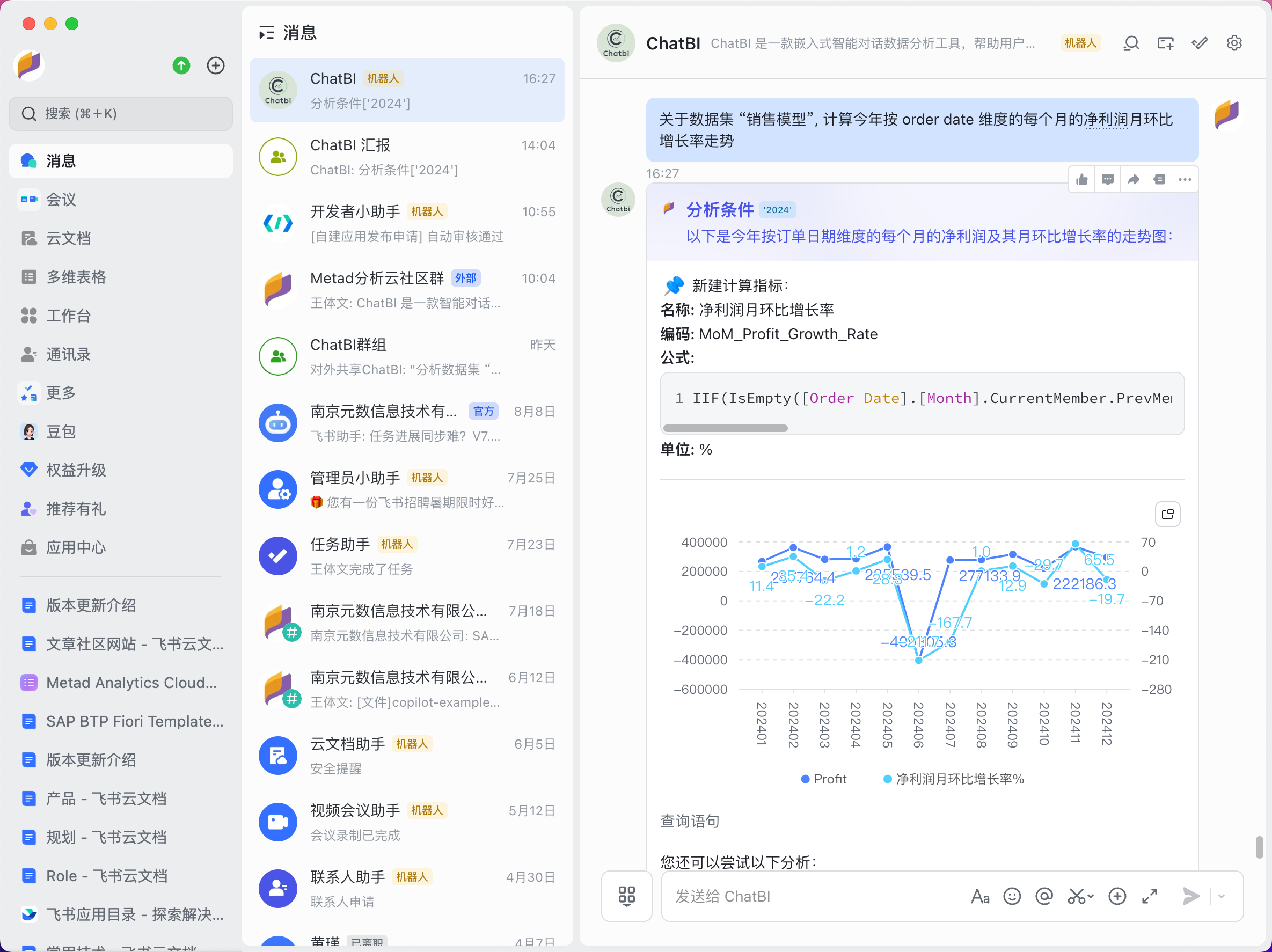
对于没有直接对应度量的指标来说，ChatBI 会自动创建计算公式指标，并使用该计算指标来回答问题，并给出相关数据结果。

<img src="https://mintcdn.com/xpertai/IL25qkwj-czMDTNd/public/img/chatbi/lark-chatbot-indicator.png?fit=max&auto=format&n=IL25qkwj-czMDTNd&q=85&s=447698757409518f4d2cae7dd22244ad" alt="Lark chatbot calculated indicator" width="2370" height="1774" data-path="public/img/chatbi/lark-chatbot-indicator.png" />

<Tip>
  计算指标的准确性还跟知识库中的知识丰富度有关，在使用 ChatBI 之前请导入相关知识库。
</Tip>

## 多轮对话

ChatBI 背后使用的技术架构属于多轮对话智能体，每次回答问题都会将本轮对话上下文内容带到大语言模型的请求当中，这样才能做到更加智能地理解用户的问题上下文。

用户可以点击机器人消息下方的“结束对话”按钮或手动输入“结束对话”来结束本轮对话。然后再次询问时将开启新一轮对话上下文。
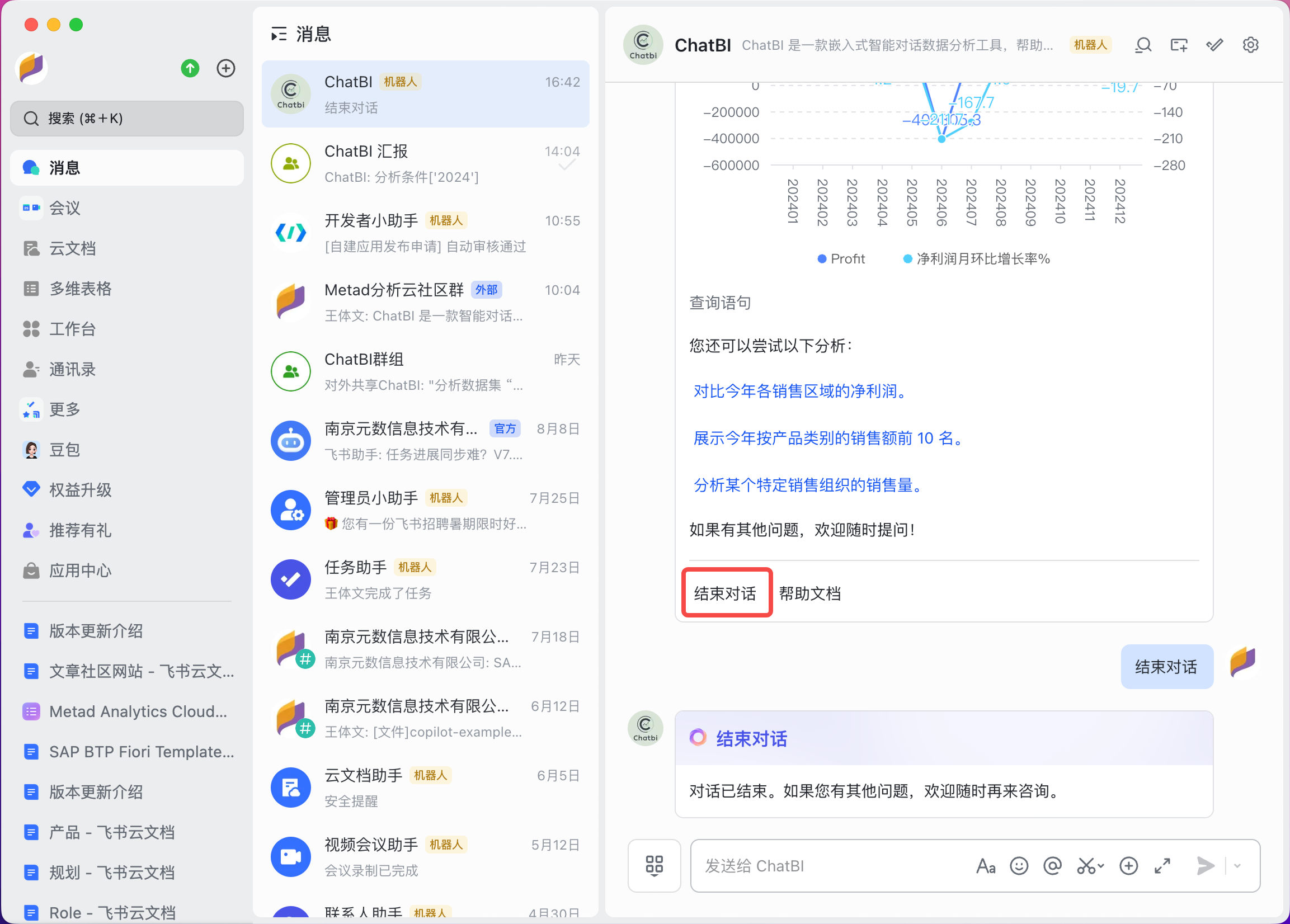
<img src="https://mintcdn.com/xpertai/IL25qkwj-czMDTNd/public/img/chatbi/lark-chatbot-end.png?fit=max&auto=format&n=IL25qkwj-czMDTNd&q=85&s=3dd20bc516e7cdb94bfb132cdc561fcf" alt="Lark chatbot end conversation" width="2306" height="1652" data-path="public/img/chatbi/lark-chatbot-end.png" />

<Tip>
  为了避免不必要的内容或者降低 token 的使用量，请及时结束对话。
</Tip>

## 群聊对话

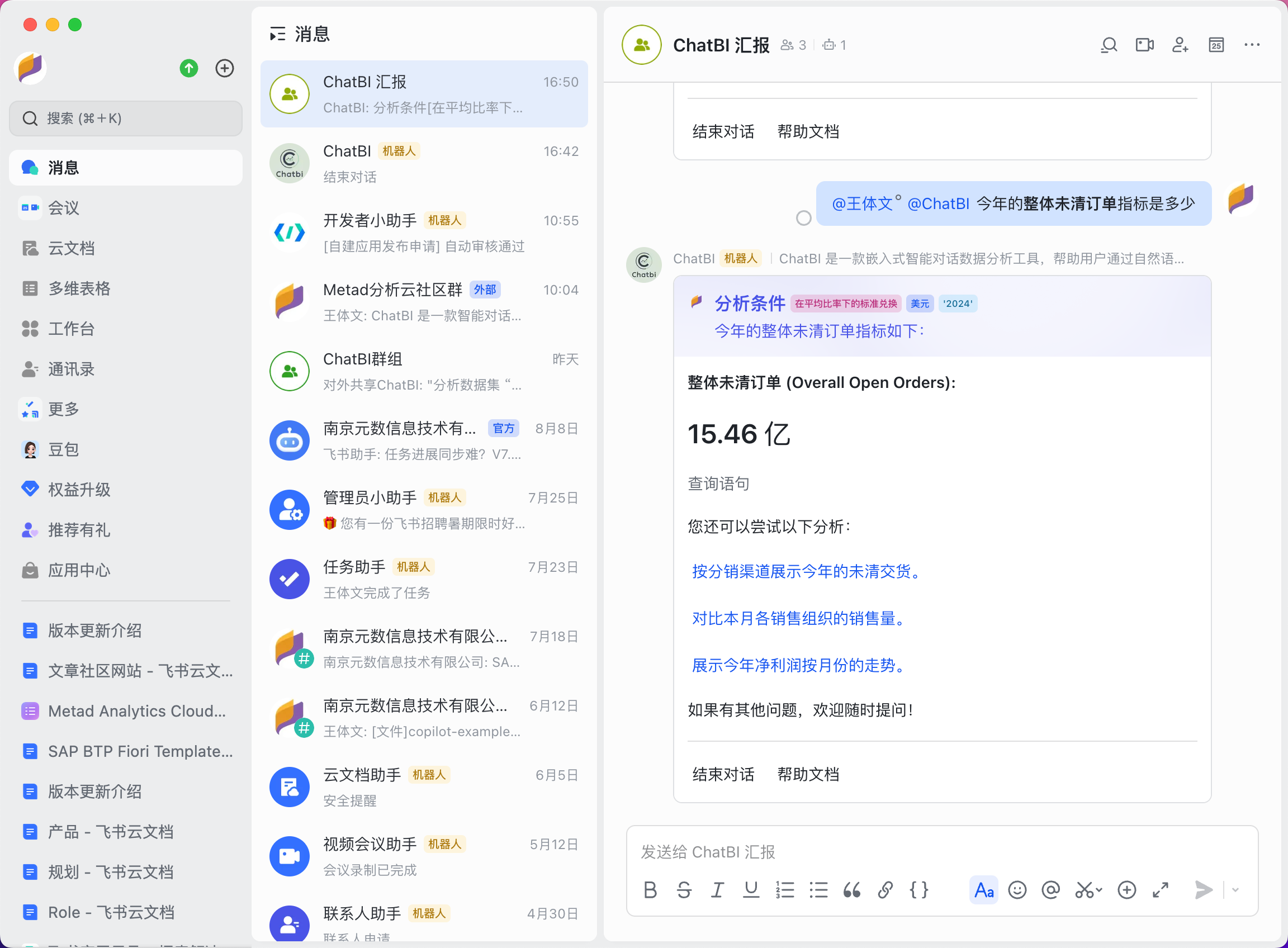
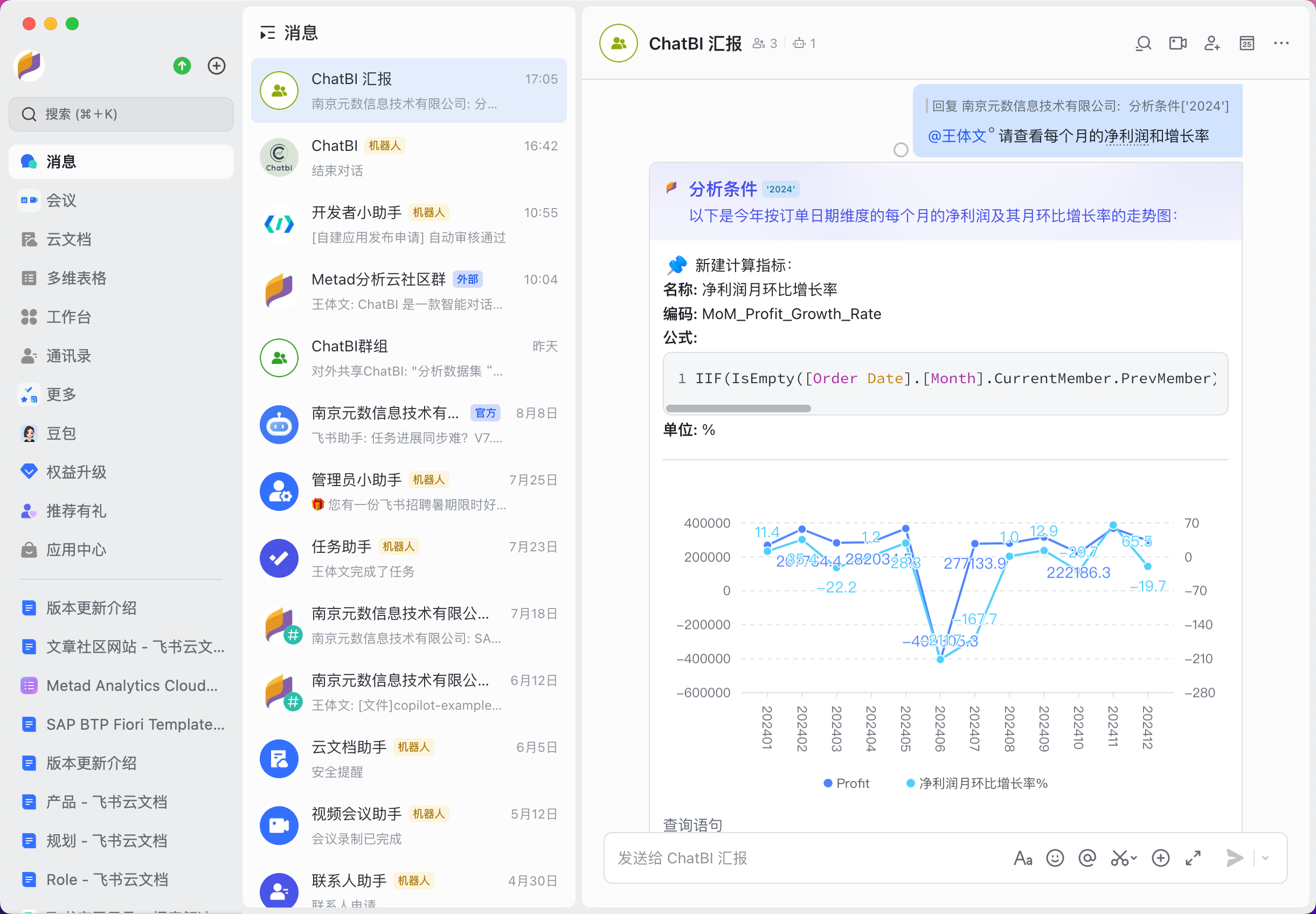
除了单人对话以外，ChatBI 支持在群里多个用户之间进行多轮对话。在群里对于 ChatBI 机器人对话，需要用户 @ 机器人并输入问题进行询问，不同用户之间会有不同的对话上下文，但如果一个用户点击另外一个用户消息中的示例按钮，对话仍然在原上下文中执行。

<img src="https://mintcdn.com/xpertai/IL25qkwj-czMDTNd/public/img/chatbi/lark-chatbot-group-kpi.png?fit=max&auto=format&n=IL25qkwj-czMDTNd&q=85&s=a56babe7eb8b65edcdedcbb2221821a6" alt="Lark chatbot in group" width="2304" height="1696" data-path="public/img/chatbi/lark-chatbot-group-kpi.png" />

<Tip>
  在群里 @ 你的老板并 @ 上 ChatBI 带上问题，让 ChatBI 智能地分析数据给老板看吧！
</Tip>

## 分享转发

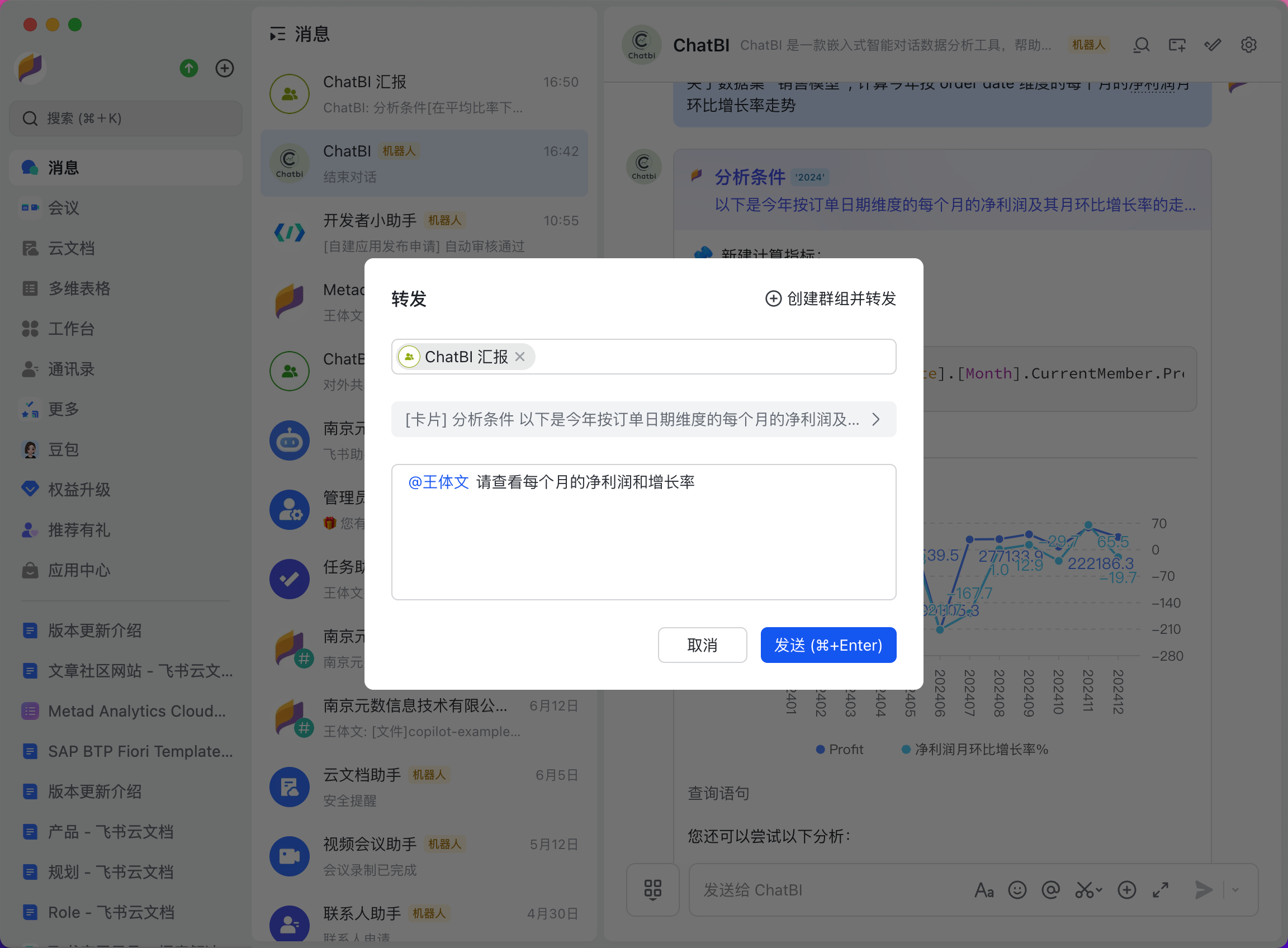
用户可以将 ChatBI 给出的问题答案消息转发给其他人或到群里，便于同事之间更加高效地协同办公。

<img src="https://mintcdn.com/xpertai/IL25qkwj-czMDTNd/public/img/chatbi/lark-chatbot-share.png?fit=max&auto=format&n=IL25qkwj-czMDTNd&q=85&s=39412e06c961bae0be224ee2d7dcb212" alt="Lark chatbot share" width="2304" height="1696" data-path="public/img/chatbi/lark-chatbot-share.png" />

分享到群内的消息。

<img src="https://mintcdn.com/xpertai/IL25qkwj-czMDTNd/public/img/chatbi/lark-chatbot-shared-message.png?fit=max&auto=format&n=IL25qkwj-czMDTNd&q=85&s=4c04bb149b3524d3c2025d1f4307d0e3" alt="Lark chatbot shared message" width="2442" height="1696" data-path="public/img/chatbi/lark-chatbot-shared-message.png" />

## 技术分析

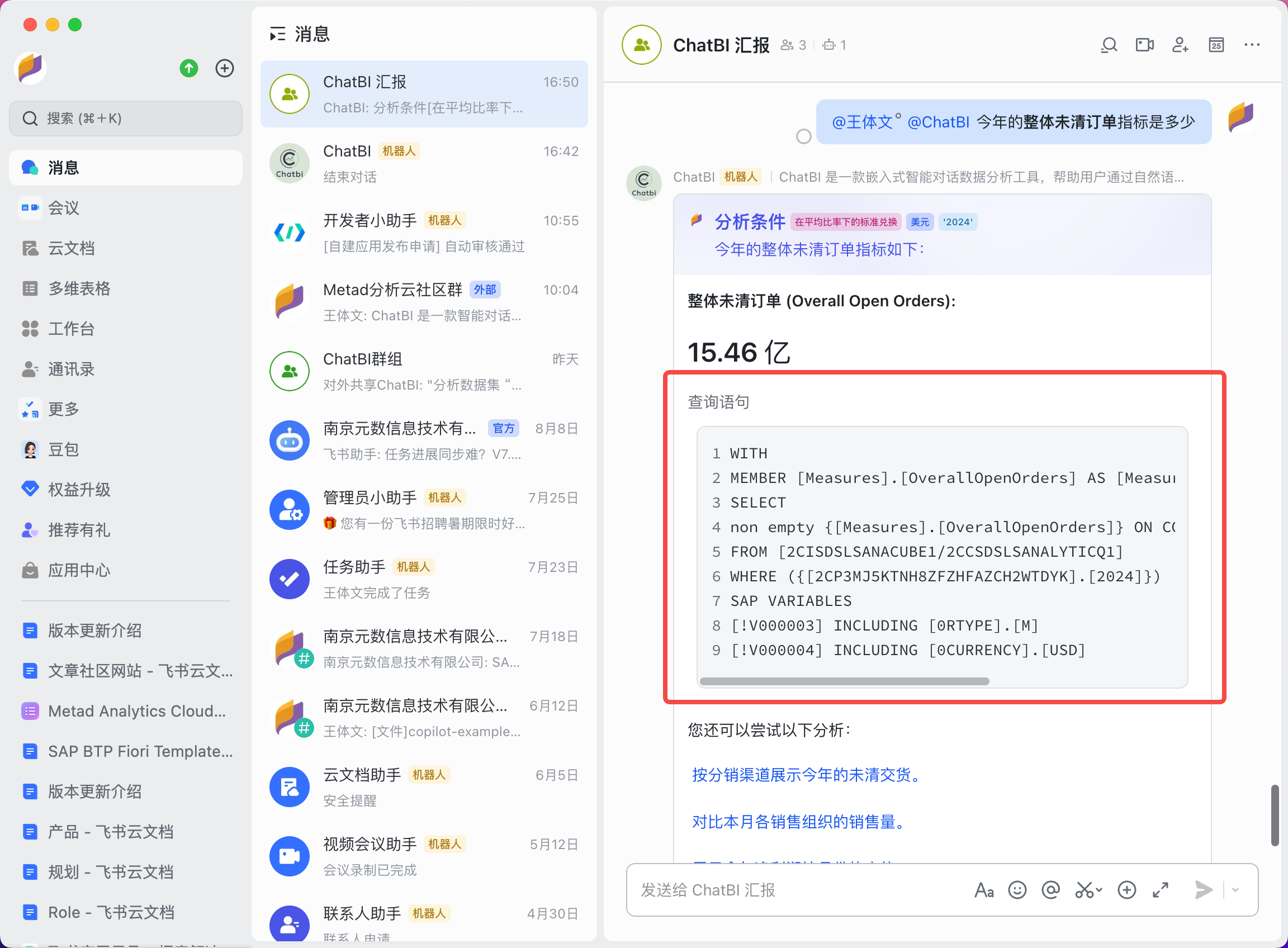
为了更快地了解 ChatBI 是如何获取数据的，用户可以打开“查询语句”按钮查看具体的查询语句，对于技术人员来说，可以根据查询语句来判断 ChatBI 所给出的答案是否准备，以便后续进行改进。

<img src="https://mintcdn.com/xpertai/IL25qkwj-czMDTNd/public/img/chatbi/lark-chatbot-query.png?fit=max&auto=format&n=IL25qkwj-czMDTNd&q=85&s=a4a53c68df754a7ab317a711ae7dbef2" alt="Lark chatbot query" width="2304" height="1696" data-path="public/img/chatbi/lark-chatbot-query.png" />

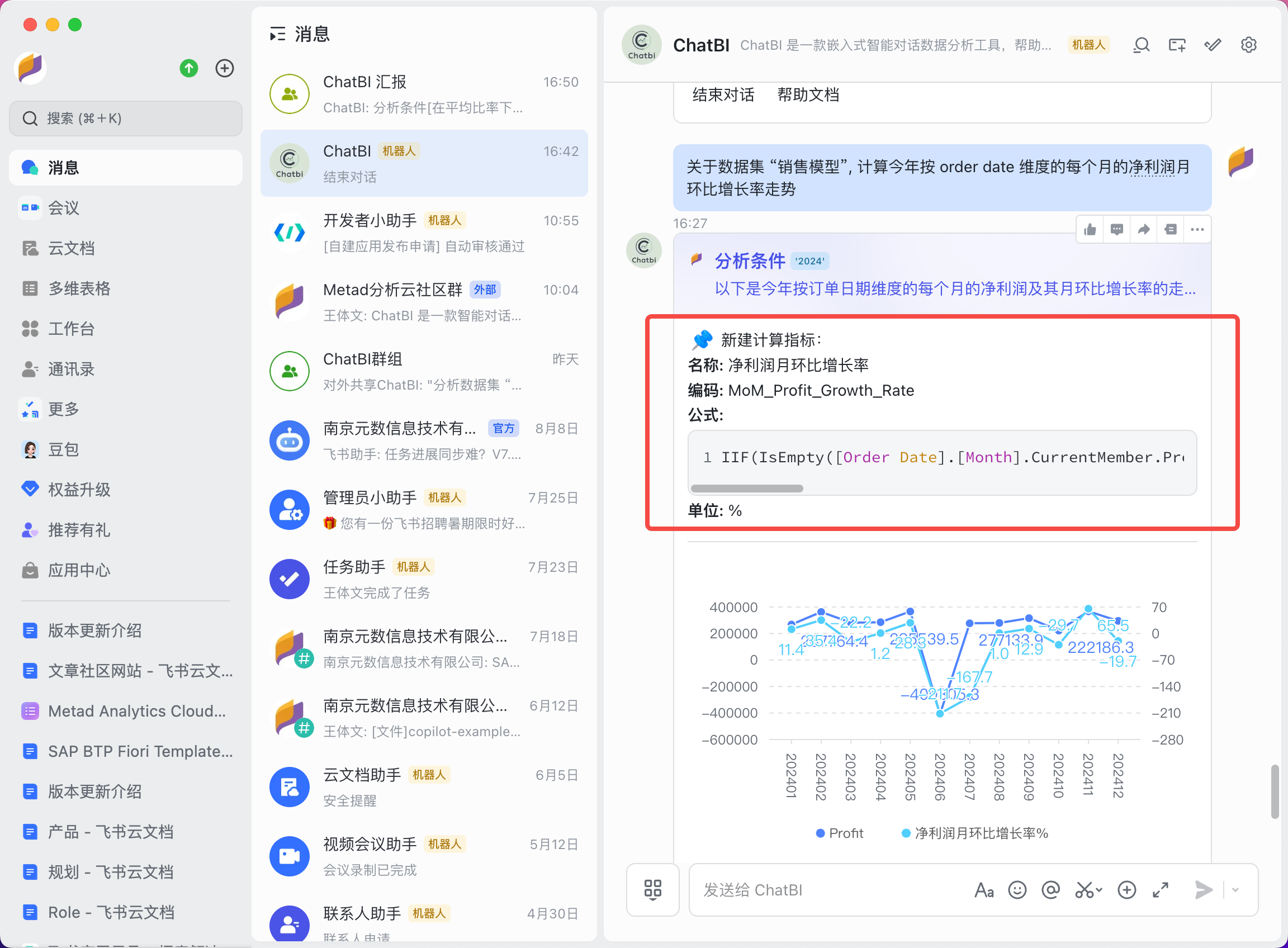
在计算指标里也可以查看计算指标的计算公式，以便更加清晰地了解 ChatBI 所给出的答案是否准确，也能对知识库进行升级。

<img src="https://mintcdn.com/xpertai/IL25qkwj-czMDTNd/public/img/chatbi/lark-chatbot-formula.png?fit=max&auto=format&n=IL25qkwj-czMDTNd&q=85&s=a40751b1be89cad1188678b4f9077d98" alt="Lark chatbot formula" width="2304" height="1696" data-path="public/img/chatbi/lark-chatbot-formula.png" />