> ## Documentation Index
> Fetch the complete documentation index at: https://docs.xpertai.cn/llms.txt
> Use this file to discover all available pages before exploring further.
# 客户端副作用
了解如何定义工具让智能体影响客户端功能。
客户端副作用用于**将模型产生的“副作用事件”推送到前端执行**,**不打断模型推理流程**,并使用服务端配置的默认值直接返回给模型。
适用于:UI 更新、视图聚焦、高亮、动画、状态同步等**只影响前端、不依赖返回值**的场景。
 ## 核心特性
* **不中断对话**:不等待前端返回结果
* **单向通知**:模型 → 前端 UI
* **自动返回结果**:使用中间件中配置的 Result
* **强 UI 表达能力**:模型可“驱动界面变化”
***
## 工作流程
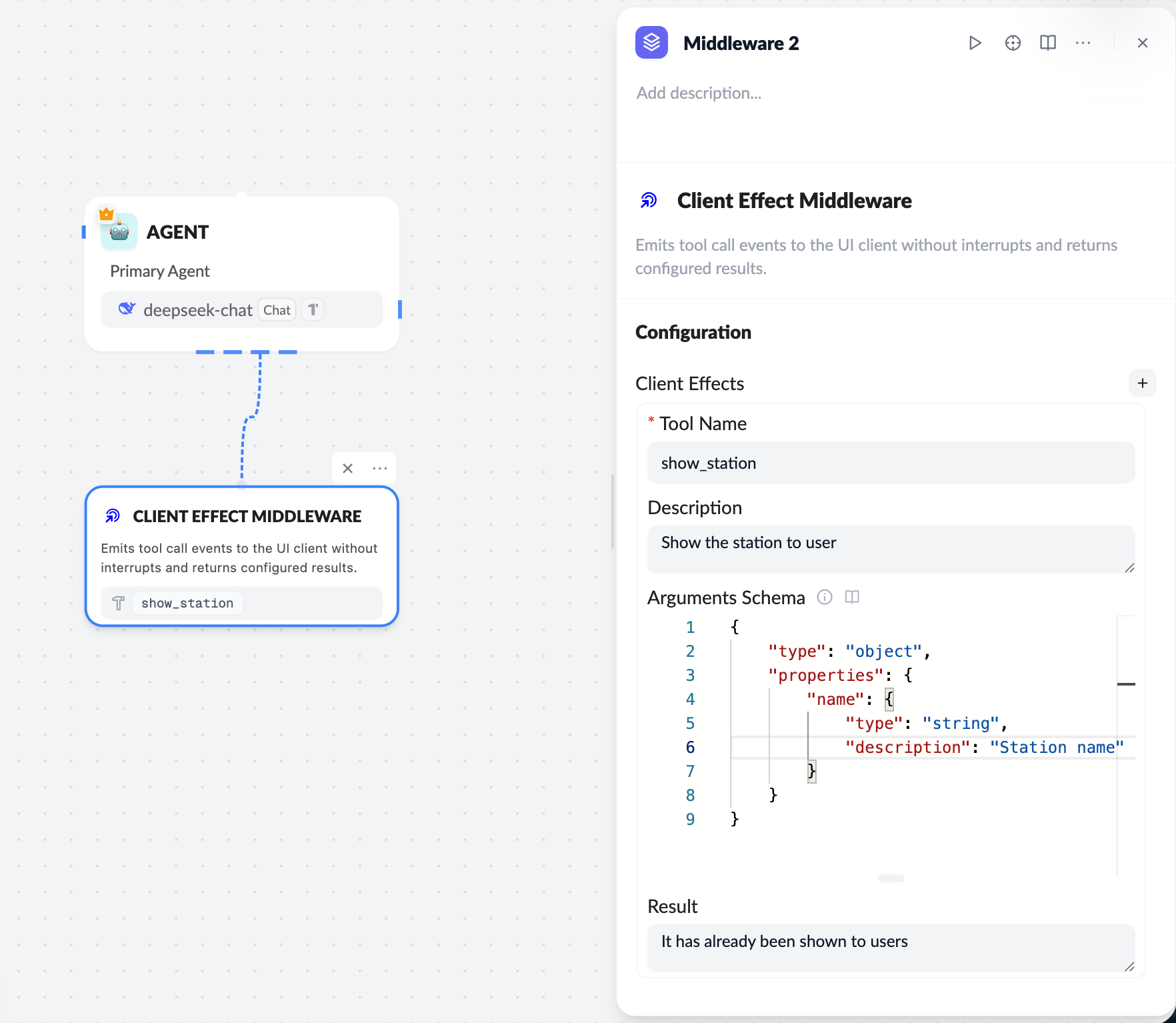
1. **服务端配置 Client Effect 中间件**
* 定义 `Tool Name / Description / Arguments Schema`
* 配置固定 `Result`
2. **模型触发 Effect**
* LLM 调用 Effect Tool(如 `show_station`)
3. **前端接收并执行**
* ChatKit 通过 `onEffect` 发送事件
* 前端执行 UI 副作用(更新状态、聚焦节点等)
4. **模型继续推理**
* 不等待前端执行完成
***
## 服务端配置要点
**Tool Name**
```text theme={null}
show_station
```
**Arguments Schema(示例)**
参数模式配置需符合 [JSON Schema 规范](https://json-schema.org/learn/getting-started-step-by-step):
```json theme={null}
{
"type": "object",
"properties": {
"name": {
"type": "string",
"description": "Station name"
}
}
}
```
**Result**
```text theme={null}
It has already been shown to users
```
***
## 前端(React)接入
在 `useChatKit` 中注册 `onEffect`:
```ts theme={null}
const handleClientEffect = useCallback(
({ name, data }) => {
if (name === 'update_mindmap' && data?.mindmap) {
setMindmap(convertMindmapFromSnake(data.mindmap));
}
if (name === 'focus_node' && data?.nodeId) {
focusNode(data.nodeId);
}
},
[]
);
```
```ts theme={null}
useChatKit({
...
onEffect: handleClientEffect,
});
```
***
## Client Tool vs Client Effect
| 对比项 | Client Tool | Client Effect |
| -------- | ----------- | --------------- |
| 是否中断推理 | ✅ 是 | ❌ 否 |
| 是否等待前端返回 | ✅ 是 | ❌ 否 |
| 是否返回动态结果 | ✅ 是 | ❌ 否(固定 Result) |
| 适用场景 | 读取状态 / 用户确认 | UI 更新 / 展示 / 聚焦 |
***
## 最佳实践
* Effect 只做 **UI 副作用**,不承担业务决策
* `name` 必须与服务端 Tool Name 完全一致
* `data` 只包含前端执行所需的最小字段
* 不要在 Effect 中做耗时或阻塞操作
***
客户端副作用让模型可以\*\*“声明式地驱动 UI 行为”\*\*,是构建 **可视化、强交互智能体体验** 的关键能力。
## 核心特性
* **不中断对话**:不等待前端返回结果
* **单向通知**:模型 → 前端 UI
* **自动返回结果**:使用中间件中配置的 Result
* **强 UI 表达能力**:模型可“驱动界面变化”
***
## 工作流程
1. **服务端配置 Client Effect 中间件**
* 定义 `Tool Name / Description / Arguments Schema`
* 配置固定 `Result`
2. **模型触发 Effect**
* LLM 调用 Effect Tool(如 `show_station`)
3. **前端接收并执行**
* ChatKit 通过 `onEffect` 发送事件
* 前端执行 UI 副作用(更新状态、聚焦节点等)
4. **模型继续推理**
* 不等待前端执行完成
***
## 服务端配置要点
**Tool Name**
```text theme={null}
show_station
```
**Arguments Schema(示例)**
参数模式配置需符合 [JSON Schema 规范](https://json-schema.org/learn/getting-started-step-by-step):
```json theme={null}
{
"type": "object",
"properties": {
"name": {
"type": "string",
"description": "Station name"
}
}
}
```
**Result**
```text theme={null}
It has already been shown to users
```
***
## 前端(React)接入
在 `useChatKit` 中注册 `onEffect`:
```ts theme={null}
const handleClientEffect = useCallback(
({ name, data }) => {
if (name === 'update_mindmap' && data?.mindmap) {
setMindmap(convertMindmapFromSnake(data.mindmap));
}
if (name === 'focus_node' && data?.nodeId) {
focusNode(data.nodeId);
}
},
[]
);
```
```ts theme={null}
useChatKit({
...
onEffect: handleClientEffect,
});
```
***
## Client Tool vs Client Effect
| 对比项 | Client Tool | Client Effect |
| -------- | ----------- | --------------- |
| 是否中断推理 | ✅ 是 | ❌ 否 |
| 是否等待前端返回 | ✅ 是 | ❌ 否 |
| 是否返回动态结果 | ✅ 是 | ❌ 否(固定 Result) |
| 适用场景 | 读取状态 / 用户确认 | UI 更新 / 展示 / 聚焦 |
***
## 最佳实践
* Effect 只做 **UI 副作用**,不承担业务决策
* `name` 必须与服务端 Tool Name 完全一致
* `data` 只包含前端执行所需的最小字段
* 不要在 Effect 中做耗时或阻塞操作
***
客户端副作用让模型可以\*\*“声明式地驱动 UI 行为”\*\*,是构建 **可视化、强交互智能体体验** 的关键能力。