> ## Documentation Index
> Fetch the complete documentation index at: https://docs.xpertai.cn/llms.txt
> Use this file to discover all available pages before exploring further.
# 维度选择器
维度选择器组件帮助用户选择多维模型中的维度及其层次结构等详细设置, 特殊位置的维度选择器还有相应的配置选择, 如在图形设置位置的维度选择器组件还包含了图形的属性设置.
## 维度选择器
如下图所示维度选择器组件, 分为维度选择和属性设置按钮两个部分, 属性设置按钮有多个分别对应不同类别的属性设置
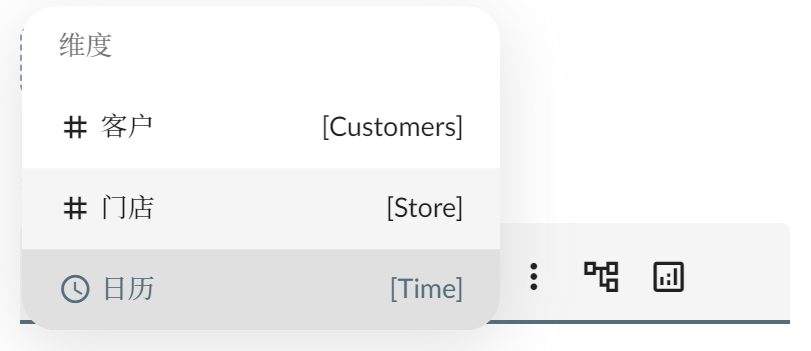
 点击下拉选择, 弹出可选维度列表如下图, 选择其中一个维度, 每个维度根据其类型不同显示不同的图标, 文本名称在左边, 技术名称在右边
 ### 层次结构设置
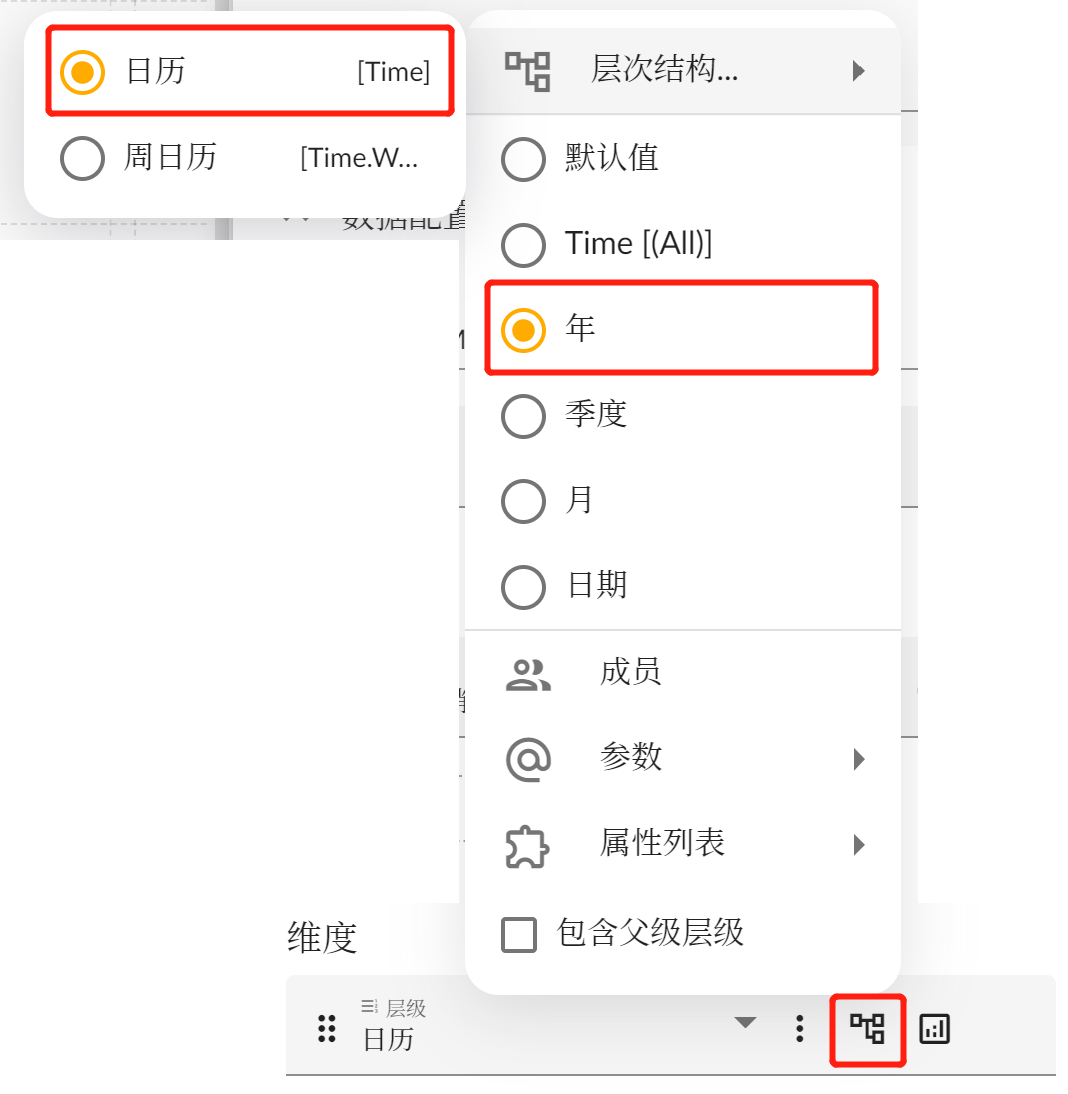
层次结构相关属性, 点击下图所示层次结构按钮可以弹出其属性设置列表. 最上方的层次结构菜单可以从多个层次结构中选择一个使用, 选择层次结构后层次结构菜单中会出现相应的层级列表, 可以继续选择一个层级. 如下图选中了 **日历** 维度中的 **日历** 层次结构, 又选中的日历层次结构中的 **年** 层级.
### 层次结构设置
层次结构相关属性, 点击下图所示层次结构按钮可以弹出其属性设置列表. 最上方的层次结构菜单可以从多个层次结构中选择一个使用, 选择层次结构后层次结构菜单中会出现相应的层级列表, 可以继续选择一个层级. 如下图选中了 **日历** 维度中的 **日历** 层次结构, 又选中的日历层次结构中的 **年** 层级.
 ### 维度成员选择
可以为维度选择固定的成员, 点击层次结构菜单中的 **成员** 菜单, 弹出维度成员选择帮助窗口.
### 维度成员选择
可以为维度选择固定的成员, 点击层次结构菜单中的 **成员** 菜单, 弹出维度成员选择帮助窗口.
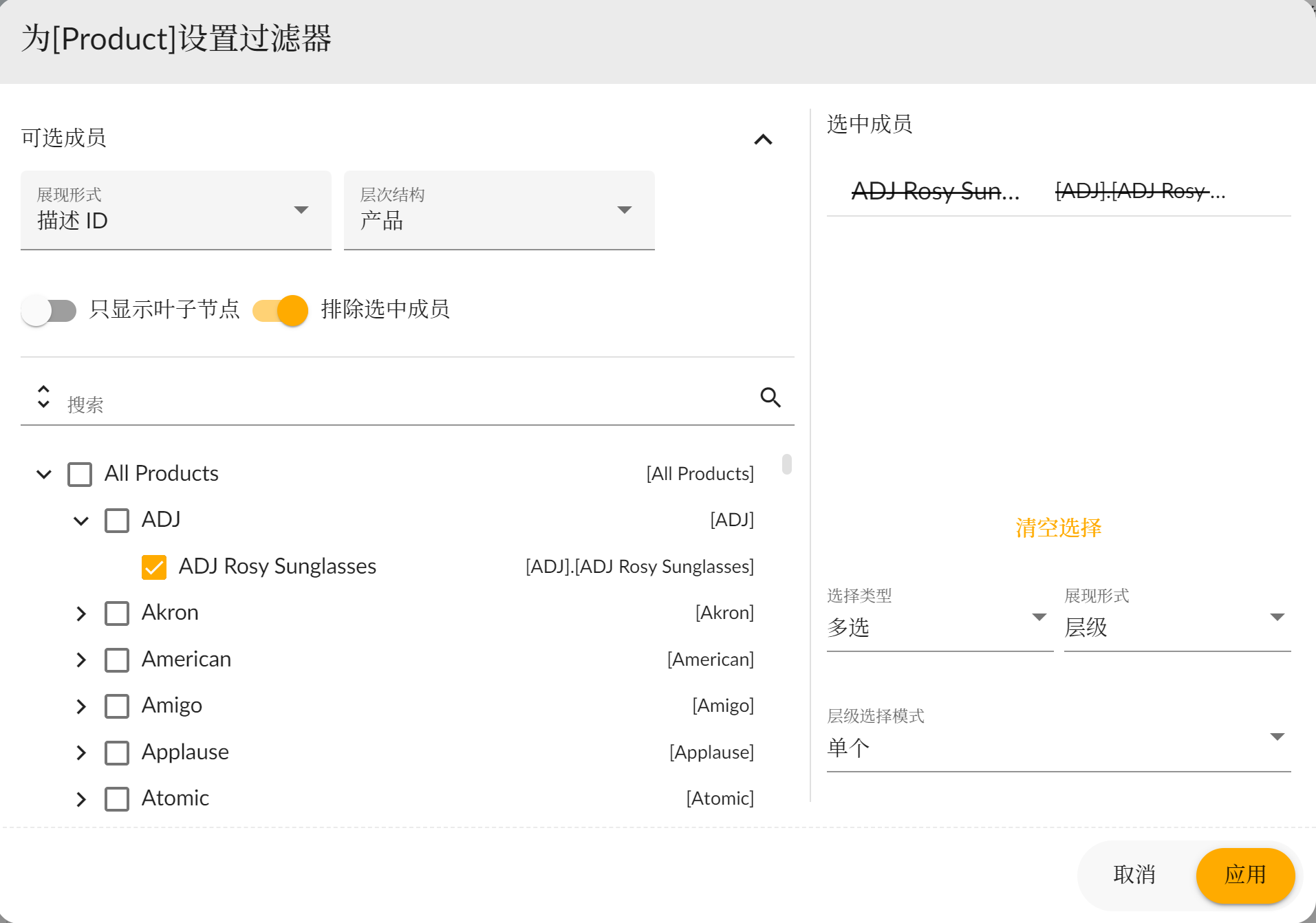 * **层次结构**: 这里的层次结构要和维度选择器本身的层次结构保持一致, 所以不要换成其他的层次结构;
* **排除选中成员**: 表示要在数据查询时排除掉选中的这些成员对应的数据;
* **搜索**: 按文本名称或技术名称搜索成员;
* **成员列表**: 可以选中一个或多个成员;
* **选中成员**: 代表已选中的成员, 如果是排除选中成员的情况下成员上会有删除线出现, 还可以从此列表中将选中的成员再次删除;
* **选择类型**: 设置单选或多选;
* **展现形式**: 可以设置树状展现或者列表平铺展现成员数据;
* **层级选择模式**: 设置树状选择的模式, 用户可以根据相应的效果自行选用;
### 参数
维度的参数设置参见 [参数](../parameter)
### 属性列表
待开发
### 包含父级层级
表示查询结果中不仅仅包含选择的层级成员, 还要包含其所有祖先成员, 结果将会形成树状层次结构.
### 显示设置
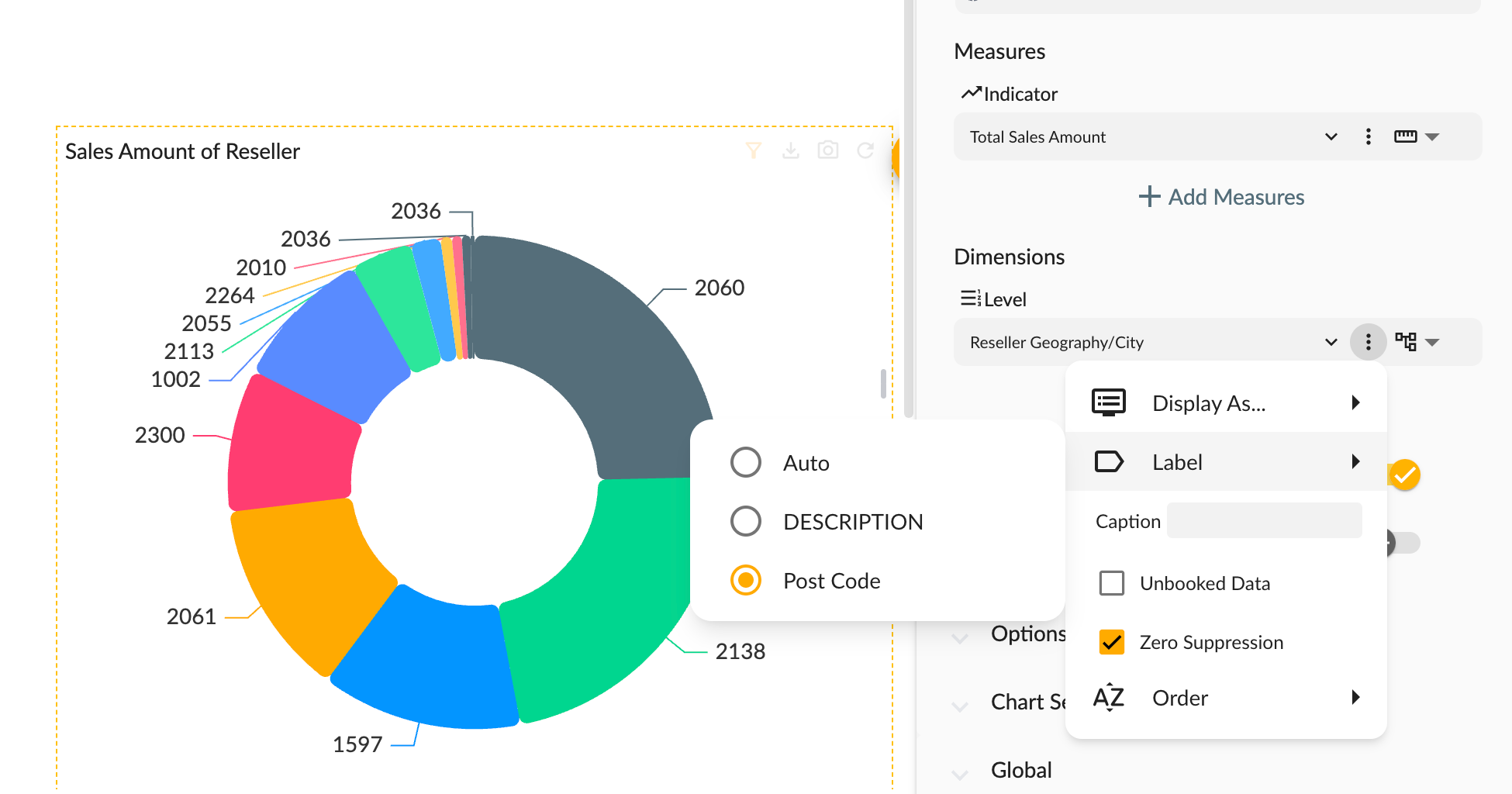
显示设置包含常用用于数据如何展示的设置,包括:
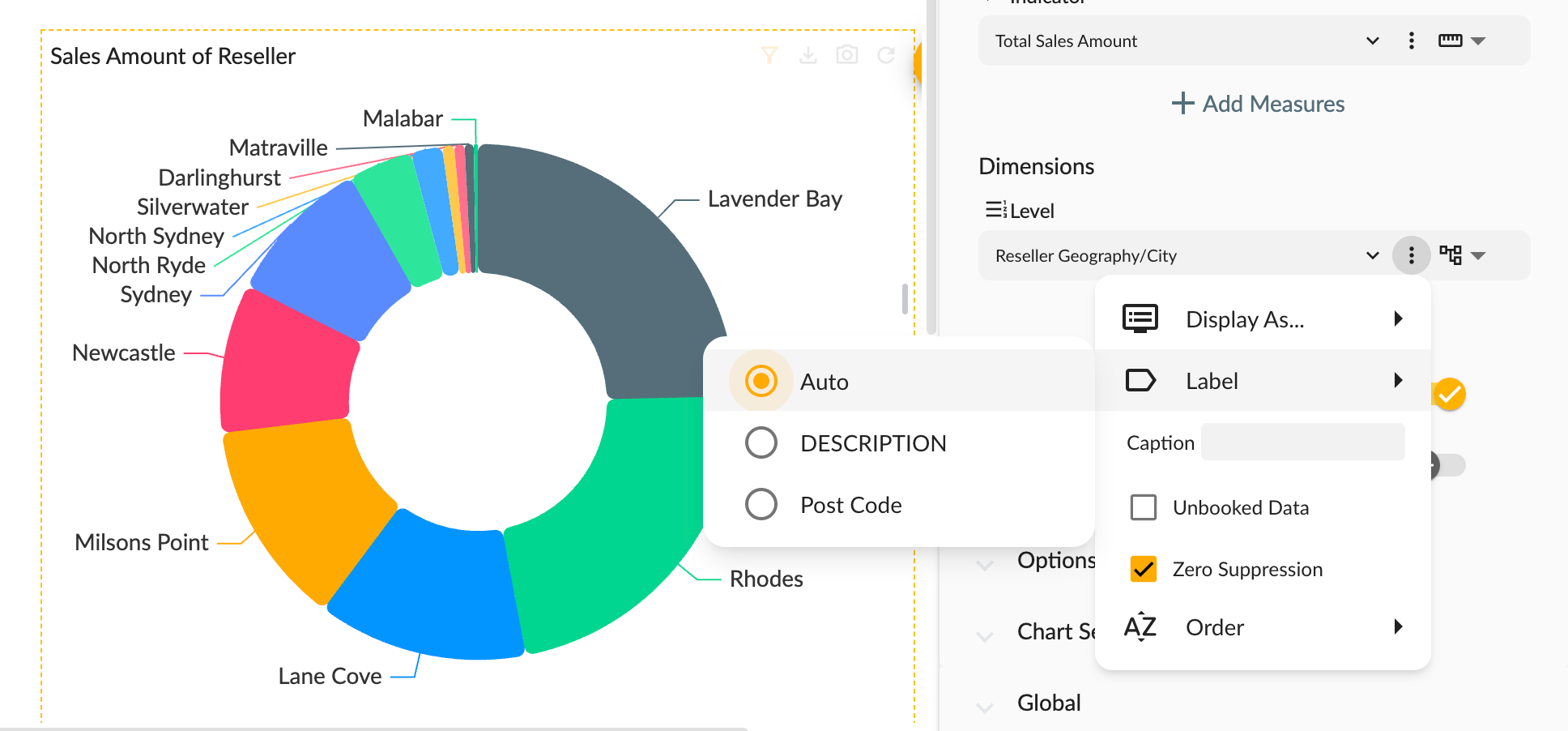
* 显示为:`自动` `描述和 ID` `仅描述` `仅 ID`。
* [成员标签](#成员标签)
* 维度标签:自定义维度标签。
* 未知成员:显示未知成员。
* 压缩空值:是否不输出空值成员。
* 排序:排序维度成员列表。
#### 成员标签
**成员标签** 指使用哪个字段作为维度成员的标签,可以是维度成员的属性字段或者维度成员的固有属性字段。
* **层次结构**: 这里的层次结构要和维度选择器本身的层次结构保持一致, 所以不要换成其他的层次结构;
* **排除选中成员**: 表示要在数据查询时排除掉选中的这些成员对应的数据;
* **搜索**: 按文本名称或技术名称搜索成员;
* **成员列表**: 可以选中一个或多个成员;
* **选中成员**: 代表已选中的成员, 如果是排除选中成员的情况下成员上会有删除线出现, 还可以从此列表中将选中的成员再次删除;
* **选择类型**: 设置单选或多选;
* **展现形式**: 可以设置树状展现或者列表平铺展现成员数据;
* **层级选择模式**: 设置树状选择的模式, 用户可以根据相应的效果自行选用;
### 参数
维度的参数设置参见 [参数](../parameter)
### 属性列表
待开发
### 包含父级层级
表示查询结果中不仅仅包含选择的层级成员, 还要包含其所有祖先成员, 结果将会形成树状层次结构.
### 显示设置
显示设置包含常用用于数据如何展示的设置,包括:
* 显示为:`自动` `描述和 ID` `仅描述` `仅 ID`。
* [成员标签](#成员标签)
* 维度标签:自定义维度标签。
* 未知成员:显示未知成员。
* 压缩空值:是否不输出空值成员。
* 排序:排序维度成员列表。
#### 成员标签
**成员标签** 指使用哪个字段作为维度成员的标签,可以是维度成员的属性字段或者维度成员的固有属性字段。
 ## 度量选择器
度量选择器可以帮助用户选择度量和设置相关属性.
## 度量选择器
度量选择器可以帮助用户选择度量和设置相关属性.
 点击度量选择下单按钮, 弹出可选度量列表, 度量列表分为三类: 度量, 计算度量和指标.
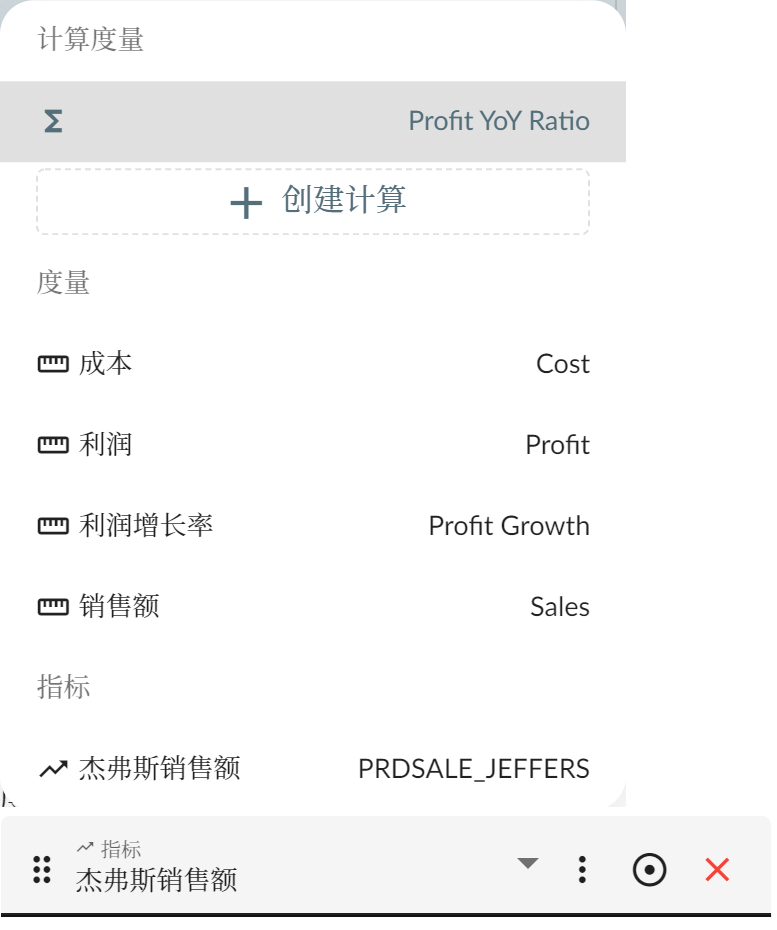 * **度量**: 来源于多维模型本身的度量;
* **计算度量**: 在客户端用户通过配置或者计算公式创建的度量, 会在查询时以用户自定义公式的形式进行数据查询. 创建计算度量详情参见 [计算成员](../calculations/);
* **指标**: 来源于指标管理系统中基于本模型创建的指标.
* **度量**: 来源于多维模型本身的度量;
* **计算度量**: 在客户端用户通过配置或者计算公式创建的度量, 会在查询时以用户自定义公式的形式进行数据查询. 创建计算度量详情参见 [计算成员](../calculations/);
* **指标**: 来源于指标管理系统中基于本模型创建的指标.