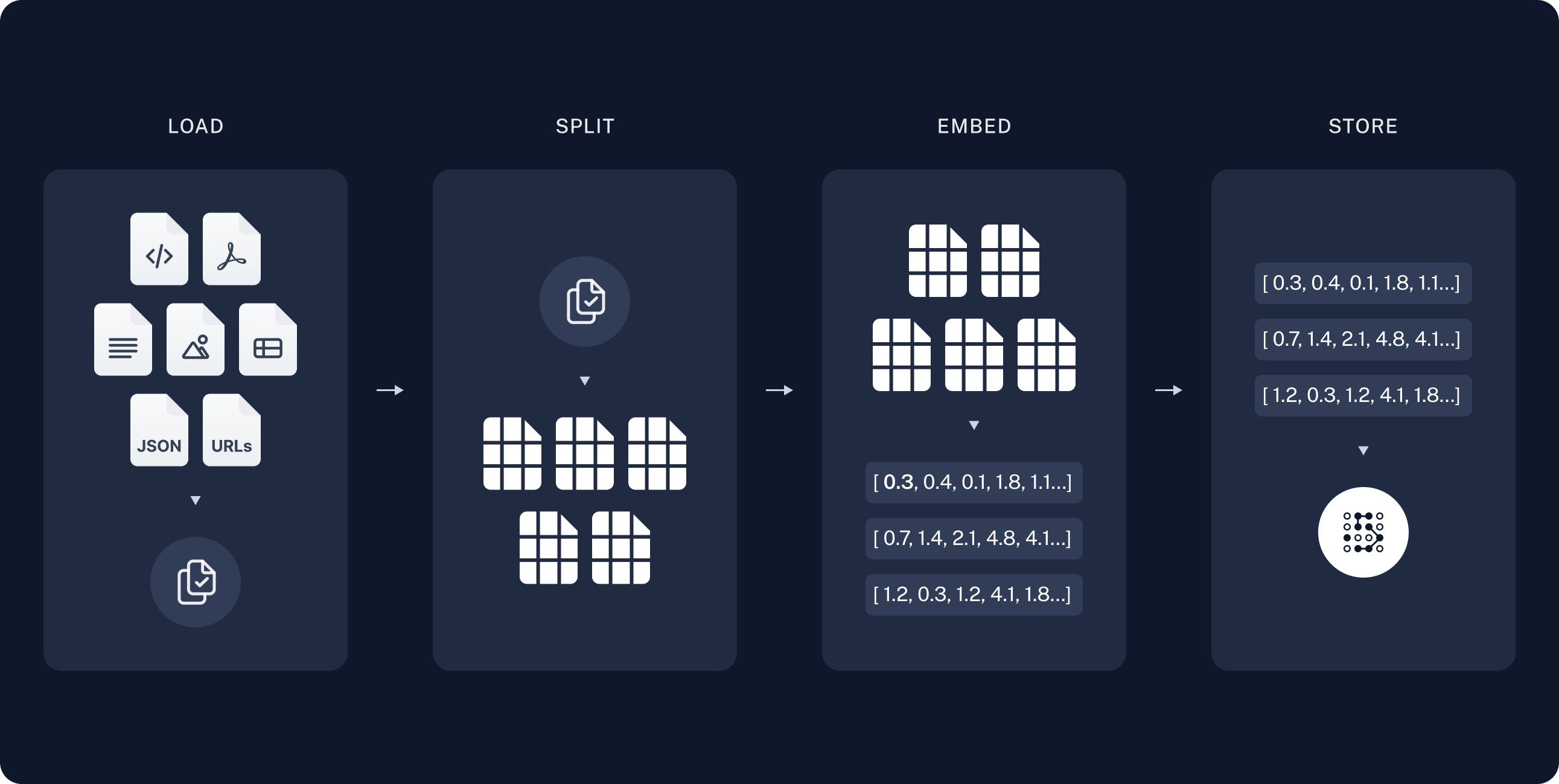
In AI conversational knowledge retrieval, the core functionalities of the knowledge base typically include document text embedding, Chunk retrieval, query optimization, and real-time updates. Below are common functionalities, with a focus on document text embedding and Chunk retrieval:

Funtions

1. Document Text Embedding

  • Text Vectorization: Using deep learning models (such as BERT, OpenAI Embeddings) to embed text into high-dimensional vectors, enabling similarity matching through vector retrieval. This forms the foundation for fast retrieval in the knowledge base and is suitable for various text types, such as documents, web pages, FAQs, etc.
  • Multilingual Support: For texts in different languages, the corresponding embedding models are used to ensure the accuracy of multilingual retrieval.
  • Data Preprocessing: Cleaning, tokenizing, and denoising the text in documents to generate high-quality vectors for embedding.
  • Context-Aware Embedding: Ensuring that the embedding model can recognize the context within the text to enhance the accuracy of responses in conversations.

2. Chunk Retrieval

  • Document Chunking: Breaking large documents into smaller chunks to improve retrieval accuracy and efficiency. Each Chunk typically consists of a few sentences or a paragraph, ensuring the system finds the most relevant specific information during retrieval rather than the entire document.
  • Embedding and Indexing Chunks: Generating independent vectors for each Chunk and storing them in a vector database for indexing. This allows the system to quickly find the Chunks most similar to the user’s query during retrieval. Rag indexing

3. Query Optimization

  • Semantic Retrieval: Using semantic search technology to convert user queries into vectors that are then matched for similarity with the embedded knowledge base content. Compared to traditional keyword retrieval, semantic retrieval better understands user intent.
  • Fuzzy Matching: Even if a query does not match the wording in a document exactly, the system can still return relevant results based on vector similarity.
  • Search Result Reordering: (todo) Reordering returned results to ensure the most relevant answers appear first. This is typically based on vector similarity scores or other user interaction data (such as click-through rates). Rag retrieval

4. Document Update and Management

  • Real-Time Updates: Supports dynamic updates to the knowledge base, ensuring the latest information can be retrieved promptly. An automated document upload and embedding update process ensures the knowledge base content is always up to date.
  • Document Type Support: The knowledge base typically supports various document formats, including PDF, Word, Markdown, plain text, etc., ensuring knowledge can be imported from different document sources.
  • Metadata Management: (todo) Adding metadata (such as creation time, document type, author, etc.) to documents and Chunks, allowing the system to perform more precise retrieval based on metadata.

5. Knowledge Base Q&A

  • Document-Based QA System: Using retrieved text Chunks, combined with models like GPT, to generate direct answers to user questions. This method usually provides fact-based, accurate responses.
  • Step-by-Step Q&A and Context Tracking: The system can retain context in continuous conversations, providing more coherent responses and adjusting retrieval results based on previous dialogues.

6. Extension and Integration

  • External Data Source Integration: The knowledge base can be integrated with external data sources (such as databases, APIs) to provide dynamic data query support.
  • Vector Database: (todo) Utilizing vector databases like FAISS, Milvus, Pinecone, which can effectively manage and retrieve large-scale embedded data.
:::warning 🚧 In Development ::: These functionalities will help make the knowledge retrieval module in Xpert AI more efficient and intelligent, especially in scenarios involving large amounts of documents and text. When designing the knowledge base retrieval system, you can optimize the speed and accuracy of Chunk retrieval by choosing the appropriate embedding models and vector databases.

Detailed Settings for the Knowledge Base

Below are the detailed configurations for the knowledge base settings:

Documents

Here is a detailed introduction to document and parsing functionalities, including document upload, document parsing, and related operation configurations:

1. Uploading Documents

Users can upload various formats of documents to the knowledge base. Supported document types include:
  • Markdown: Used for lightweight markup language documents, easy to read and edit.
  • PDF: Suitable for preserving formatted documents, ideal for long articles and reports.
  • EPUB: An e-book format that supports reading on various devices.
  • DOCX: Microsoft Word documents, widely used for text editing and formatting.

2. Document Parsing

Uploaded documents need to be parsed to extract their content and store it in the knowledge base. The parsing process can be configured as follows:

3. Start Parsing

Once the configuration is complete, users can start the parsing process. The parsing task will run on the server-side, and the system will execute the following steps:
  • Read Document: Load the uploaded document and perform format parsing.
  • Extract Content: Based on the configured chunk size, chunk overlap, and delimiter, split the document content into multiple text chunks.
  • Generate Embeddings: Call the AI model to generate vector embeddings for each text chunk for subsequent retrieval and query use.

4. Re-parse or Delete Documents

  • Re-parse: Users can choose to re-parse a document at any time to update its configuration or content. This will re-execute the parsing process and replace old document chunks.
  • Delete Document: Users can delete documents no longer needed, and the system will automatically delete all associated document chunks. This ensures the knowledge base content remains clean and accurate.

Retrieval Testing

The retrieval testing feature is used to validate the effectiveness and accuracy of the knowledge base retrieval, ensuring the system can effectively retrieve relevant information from the knowledge base. Below are detailed parameter introductions for this feature:

Function Flow:

  1. Input: The user enters a query in the input box.
  2. Similarity Calculation: The system vectorizes the user’s input text and calculates similarity with all text blocks in the knowledge base.
  3. Filtering: Based on the set similarity threshold, filter out text blocks with similarity below the threshold.
  4. Sorting: Sort the remaining text blocks by similarity and return the most relevant results.
  5. Return Results: The system returns the specified number of retrieval results based on the “Top N” setting.