For general AI Assistant functionality, please refer to 🤖 AI Assistant.
Semantic Model Copilot Command List:
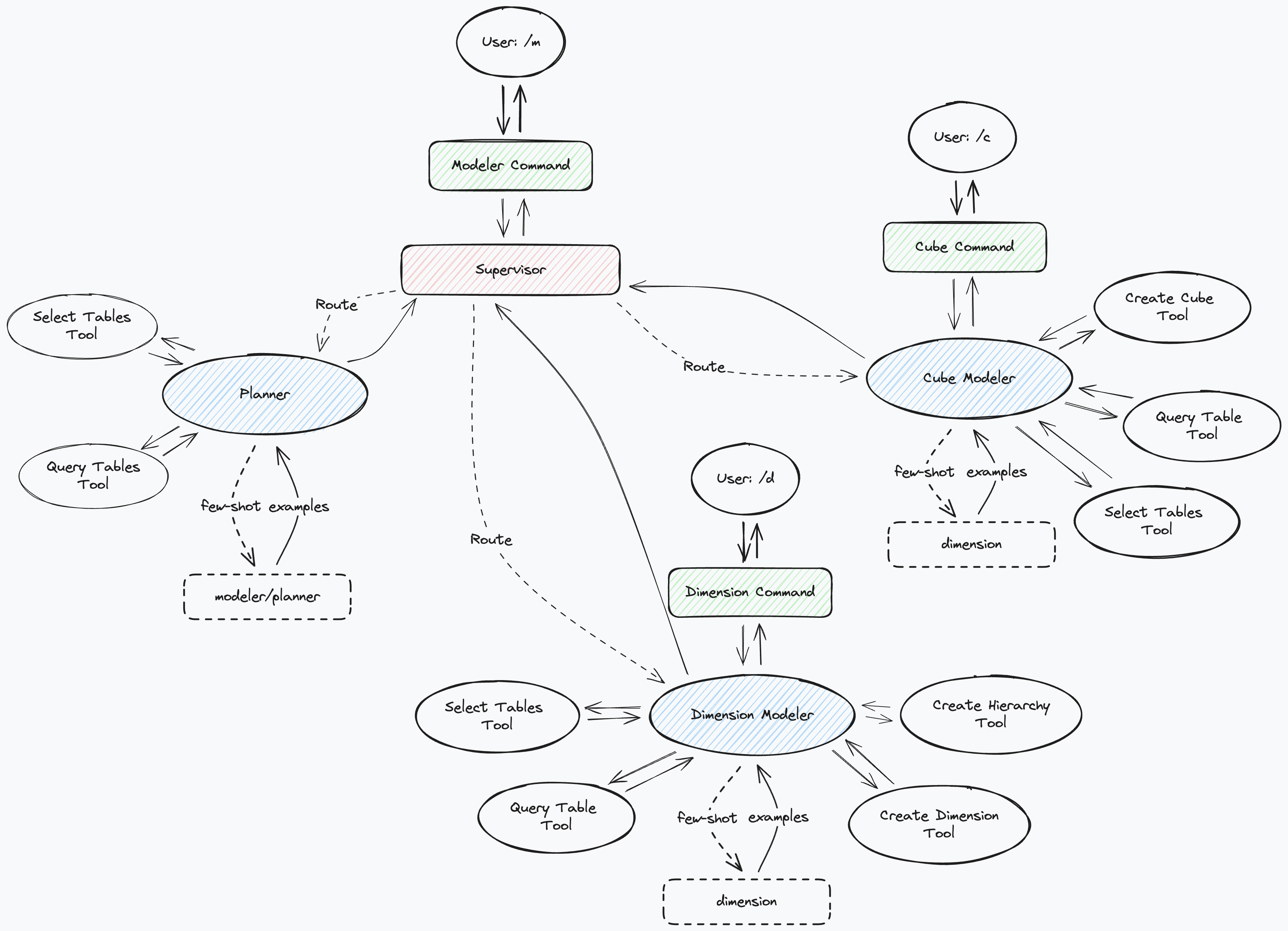
Model Global Commands
In the semantic model interface, the AI Assistant has the following commands available:
/table /t 🦜️🔗 Create physical table/dimension /d 🦜️🔗 Create dimension/cube /c 🦜️🔗 Create cube
/table
The /table or /t 🦜️🔗 command is used to create physical tables.
/dimension
The /dimension /d 🦜️🔗 command is used to create shared dimensions based on table information and questions.
Users need to provide necessary dimension table information. You can drag table names from the data table area into the copilot to insert metadata into the conversation.
/cube
The /cube /c 🦜️🔗 command is used to create cubes based on table information and questions.
Users need to provide necessary cube information. You can drag table names from the data table area into the copilot to insert metadata into the conversation.
Query Lab Commands
In the Query Lab interface, the AI Assistant has the following commands available:
/query 🦜️🔗 Execute data queries based on user descriptions;
Copilot conversation content in this interface can be saved in query records. When users reopen a query, the copilot conversation content will be restored. For more Query Lab functionality, please refer to Query Lab
/query
The /query /q 🦜️🔗 command is used to execute data queries based on user descriptions. Users need to provide necessary query logic information and table information.
Users can drag table names from the table area to the Table Structure area to provide necessary table information.
Querying Multidimensional Data Sources
If the semantic model’s corresponding data source is a multidimensional data source (such as SAP BW, Microsoft Analysis Services, and other systems supporting Xmla interface services), the Query command automatically uses MDX syntax statements for queries.
Dimension Interface Commands
The following commands are available:
/hierarchy /h 🦜️🔗 Create new hierarchy based on user description
/hierarchy
The /hierarchy /h 🦜️🔗 command is used to create new hierarchies
Users need to drag the tables to be used from the data table area into the AI dialog box to provide necessary dimension table information. If table information is not provided, the copilot will only create hierarchies based on table information used in the current dimension.
Dataset Commands
The following commands are available:
/calculated /calc 🦜️🔗 Create new calculated member;
Query Interface
/query /q 🦜️🔗 Execute data queries based on user description
Calculation Interface
/formula /f 🦜️🔗 Modify the current calculation formula based on user description.
/query
The /query /q 🦜️🔗 command is used to execute data queries based on user descriptions.
The /query command can also modify query statements in the current editor:
/calculated
The calculated /calc 🦜️🔗 command is used to create new calculated members. Users need to provide necessary calculation logic information.
The /formula /f 🦜️🔗 command is used to edit the current calculated measure formula. Users need to provide necessary calculation logic information.
Access Control Interface Commands
The following commands are available:
/role Create role based on user description
Virtual Cube Page Commands
The /formula command is used to create suggestions for virtual cube calculation formulas. Users can enter commands and requirements in the copilot dialog box, and the copilot will generate corresponding calculation formulas for you.
/modeler
/modeler or /m The data modeler can create shared dimensions and multidimensional datasets based on user prompts and table information, referencing business role examples. This command makes the data modeling process more automated and efficient, allowing users to focus on data analysis and decision-making.